 Our Client Reviews


How Much Should a Small Business Spend on Its Website in 2026?
A professional website is one of the most important investments a small business can make. It helps potential customers discover your services, understand your offerings, build trust in your brand, and contact your business. However, one common question business owners face is: How much should a small business spend on its website?
The answer depends on your business goals, required features, design expectations, content, integrations, and long-term growth plans. A simple informational website may require a relatively small budget, while a custom business website with advanced functionality can require a significantly larger investment.
In this guide, we will explain website development costs for small businesses in 2026, the factors that influence pricing, ongoing expenses, and how to choose the right website solution for your business.
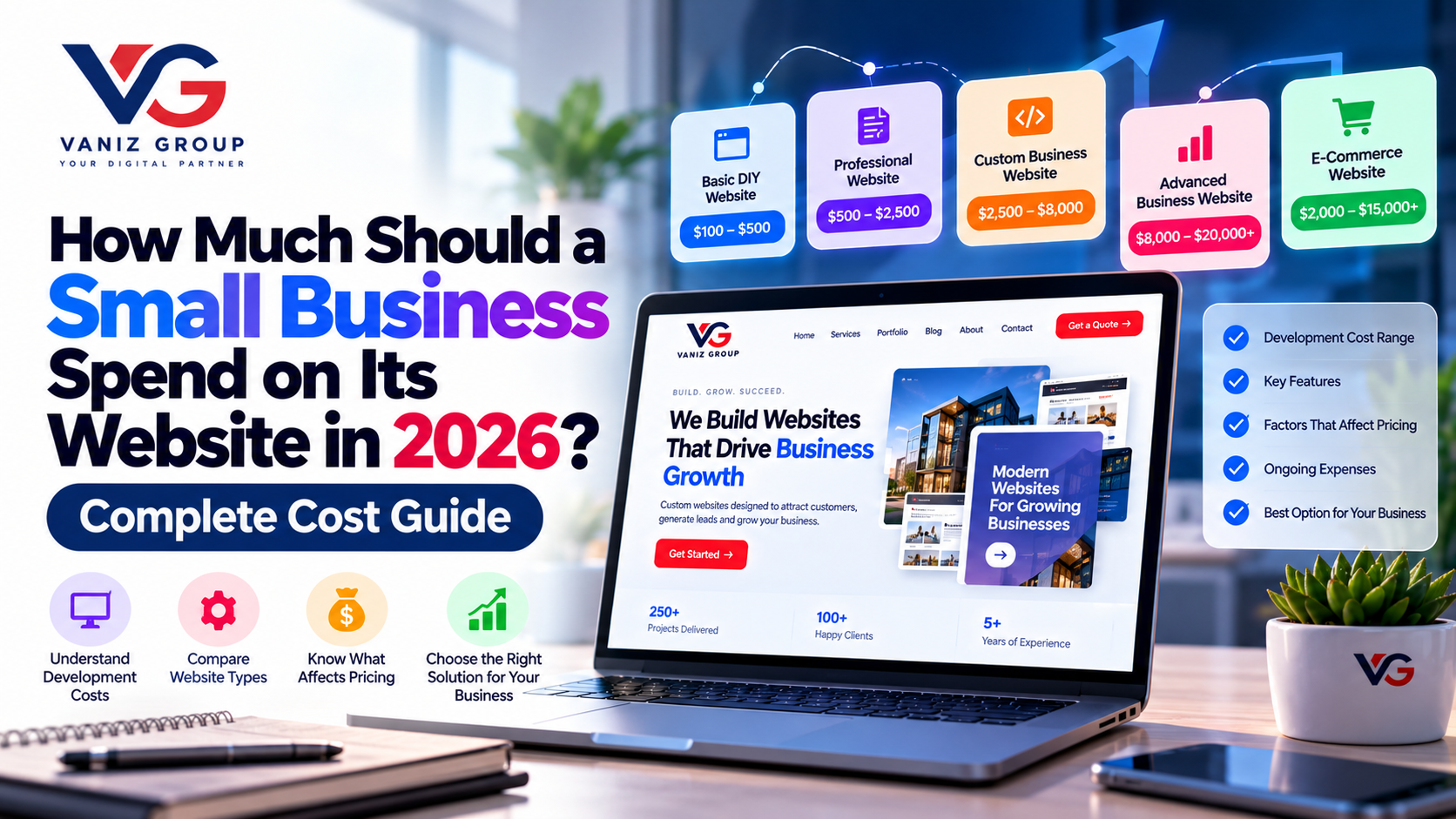
How Much Does a Small Business Website Cost in 2026?
The cost of a small business website depends on its complexity and how it is built. The following ranges are general planning estimates in US dollars, not fixed market prices.
Website Type | Estimated Development Cost |
|---|---|
Basic DIY Website | $100–$500 |
Simple Professional Website | $500–$2,500 |
Custom Small Business Website | $2,500–$8,000 |
Advanced Business Website | $8,000–$20,000+ |
Custom Web Application | $10,000–$50,000+ |
E-Commerce Website | $2,000–$15,000+ |
These estimates can overlap depending on the provider, country, design quality, content requirements, integrations, and project scope. A custom web application may cost considerably more when it includes complex workflows, user accounts, dashboards, or third-party systems.
The most important factor is not choosing the cheapest option. It is choosing a website that meets your business needs without paying for unnecessary features.
1. Basic DIY Website: $100–$500
A DIY website can be suitable for freelancers, new businesses, and small companies that need a simple online presence.
Business owners can use website builders or pre-designed templates to create pages without extensive custom development.
Typical features include:
Homepage
About Us page
Services or products page
Contact form
Basic mobile-responsive design
Social media links
Basic SEO settings
This option may involve a domain name, hosting, a website builder subscription, and a paid template.
Best for: Businesses with limited budgets that need a simple website and are comfortable managing it themselves.
The main limitation is that advanced customization, complex integrations, and unique business workflows may be difficult or expensive to implement.
2. Professional Small Business Website: $500–$2,500
A professionally developed website can provide a stronger brand presence, better user experience, and more control over how visitors interact with your business.
Typical features may include:
Customizable design based on your brand
Five to ten core pages
Mobile-friendly layouts
Contact and inquiry forms
Service pages
Basic on-page SEO
Analytics integration
Security configuration
Social media integration
Basic performance optimization
The final price depends on whether the website uses a customized template or includes more extensive design and development work.
Best for: Consultants, local service providers, small agencies, professional firms, and businesses that want to generate leads online.
3. Custom Small Business Website: $2,500–$8,000
A custom website is appropriate when a business needs more control over design, content structure, integrations, or functionality.
It can be built using technologies such as WordPress, React, Next.js, or other suitable platforms, depending on the requirements.
Features may include:
Custom UI/UX design
Tailored service pages
Blog or resource section
Advanced contact forms
CRM integration
Booking or inquiry workflows
Custom landing pages
SEO-friendly architecture
Analytics and conversion tracking
Content management capabilities
Best for: Growing businesses that rely on their website for lead generation, marketing, customer acquisition, and brand differentiation.
A well-planned custom website can also provide a foundation for adding new features as the business expands.
4. Advanced Business Website: $8,000–$20,000+
Some businesses need more than a standard marketing website. They may require interactive features, multiple user roles, complex integrations, or business-specific workflows.
Examples include:
Customer portals
Appointment booking systems
Advanced search and filtering
Membership areas
Custom dashboards
Automated notifications
CRM and ERP integrations
Multilingual functionality
Advanced reporting
Custom database-driven features
The cost depends on the complexity of the functionality, the number of integrations, security requirements, and testing effort.
Best for: Businesses with specialized operations or customer experiences that cannot be handled effectively by a basic website.
5. E-Commerce Website: $2,000–$15,000+
An e-commerce website allows businesses to sell products or services online.
The budget depends on whether you use a hosted platform, a content management system with e-commerce functionality, or custom development.
Common features include:
Product catalog
Categories and filters
Product details
Shopping cart
Checkout
Payment gateway integration
Order management
Inventory management
Shipping configuration
Customer accounts
Order notifications
Sales analytics
A simple online store can be less expensive than a customized store with large product catalogs, multiple warehouses, subscriptions, or complex integrations.
Best for: Retailers, product brands, wholesalers, and businesses planning to sell online.
What Factors Affect Website Development Costs?
Understanding the factors that influence pricing helps you prepare a realistic budget.
1. Number of Pages
A website with five pages usually requires less content creation, design, and testing than one with fifty pages.
However, page count alone does not determine the cost. A single page with complex functionality may require more work than several standard informational pages.
2. Design and User Experience
A pre-designed template generally costs less than a fully customized design.
Custom UI/UX work may include user research, wireframes, prototypes, responsive layouts, and usability testing.
The goal is to make it easy for visitors to understand your business and take the next step.
3. Website Functionality
Features such as booking systems, customer accounts, calculators, dashboards, membership areas, and personalized experiences increase development effort.
Define which features are essential before development begins.
4. Content Creation
Your budget may need to cover:
Website copywriting
Product descriptions
Service descriptions
Professional photography
Illustrations
Videos
Case studies
Blog content
High-quality content helps visitors understand your services and supports your marketing strategy.
5. SEO Requirements
Basic SEO setup may include page titles, meta descriptions, heading structure, descriptive URLs, image alt text, and sitemap configuration.
More extensive SEO work may include keyword research, content planning, technical audits, structured data, internal linking, and ongoing optimization.
Remember that website development and ongoing SEO are related but separate investments.
6. Third-Party Integrations
Connecting a website to external services can add development and testing costs.
Examples include:
CRM platforms
Payment gateways
Email marketing services
Appointment scheduling tools
Shipping systems
Accounting software
WhatsApp messaging services
Analytics platforms
Some integrations are straightforward, while others require custom API development.
7. Security and Performance
A business website should be configured with appropriate security controls, backups, updates, and performance optimization.
More advanced websites may need additional monitoring, access controls, security testing, and infrastructure planning.
Website Development Cost by Technology
The technology you choose can influence both initial development and long-term maintenance.
WordPress
WordPress can be a practical choice for service businesses, company websites, blogs, and many content-driven websites.
It offers a large ecosystem of themes and plugins. Costs depend on customization, plugin licensing, hosting, maintenance, and any custom development.
Shopify
Shopify is designed for e-commerce businesses that want a managed platform for online selling.
Costs can include platform subscriptions, themes, apps, payment processing, and custom development.
Custom Development
Custom development can provide greater control over user experience, integrations, and specialized business workflows.
It may be appropriate when standard platforms cannot meet your requirements efficiently. However, custom solutions may involve higher initial costs and ongoing technical maintenance.
The best option depends on your business model, required features, budget, and plans for growth.
What Are the Ongoing Costs of Maintaining a Website?
Website development is only part of the total investment. Your business should also budget for operating and maintaining the website.
Expense | Typical Planning Range |
|---|---|
Domain name | $10–$30 per year |
Basic hosting | $5–$50 per month |
Managed or specialized hosting | $30–$200+ per month |
Premium themes and plugins | $50–$500+ per year |
Maintenance and updates | $50–$500+ per month |
Ongoing SEO services | $300–$2,000+ per month |
These are illustrative ranges. Actual prices vary by provider, region, hosting requirements, licensing, service scope, and website complexity. Some businesses may spend less by managing their own website, while more demanding websites may require significantly higher maintenance budgets.
Your total cost of ownership should include development, hosting, software subscriptions, maintenance, security, content updates, and marketing.
How Much Should Your Business Budget for a Website?
Instead of choosing a budget based only on what other businesses spend, consider what the website needs to achieve.
If You Are Just Starting
Focus on essential pages, clear service information, mobile responsiveness, contact forms, and basic SEO.
Avoid expensive features until you have validated your business needs.
If You Want More Leads
Invest in strong service pages, conversion-focused design, fast loading times, analytics, relevant landing pages, and CRM integration where appropriate.
The website should make it easy for potential customers to contact you.
If You Sell Products Online
Budget for product management, checkout, payments, shipping, inventory, order notifications, and customer support.
Make sure the platform supports your sales and fulfillment processes.
If You Need Custom Business Functionality
Prepare a detailed requirements document and request a scoped proposal. Identify the workflows, user roles, integrations, security requirements, and expected usage before estimating the project.
How to Get the Best Value From Your Website Budget
A limited budget does not mean you must compromise on every aspect of quality.
Follow these practices to make your investment more effective.
1. Define Your Business Goals
Decide whether your primary goal is generating leads, selling products, building credibility, booking appointments, or supporting existing customers.
2. Prioritize Essential Features
Separate must-have features from enhancements that can be added later.
3. Choose the Right Platform
Don't choose custom development when an existing platform meets your requirements. Equally, don't force a standard template to handle workflows it was never designed for.
4. Prepare Your Content Early
Provide your developer with your business information, service descriptions, images, brand assets, and calls to action as early as possible.
5. Make Mobile Usability a Priority
Potential customers may visit your website from phones, tablets, and desktop computers. Ensure the experience works well across screen sizes.
6. Plan for Maintenance
Clarify who will manage updates, backups, security, content changes, and technical support after launch.
7. Measure Results
Use analytics to understand traffic, inquiries, conversion rates, and visitor behavior. Improve the website based on real data rather than assumptions.
Common Mistakes Small Businesses Should Avoid
Some website decisions can create unnecessary costs or limit future growth.
Choosing the cheapest provider without checking quality and deliverables
Paying for features the business does not need
Ignoring mobile responsiveness
Launching without clear calls to action
Treating SEO as an afterthought
Forgetting domain, hosting, and maintenance costs
Using too many plugins without considering performance or security
Failing to clarify ownership of the website, domain, and content
Not checking whether the website can be updated easily
Expecting a website alone to guarantee sales or leads
A successful website combines appropriate technology, useful content, good user experience, and ongoing business development.
Is a Website Worth the Investment for a Small Business?
A website can be a valuable long-term business asset when it supports a clear objective.
It can help customers find your business, evaluate your services, submit inquiries, purchase products, book appointments, and access information outside business hours.
However, results depend on factors such as demand, competition, content quality, usability, search visibility, and marketing.
To evaluate the investment, track meaningful outcomes such as qualified leads, sales, bookings, and customer acquisition costs—not just website visits.
Final Thoughts
The amount a small business should spend on its website depends on what the business needs to accomplish.
A basic website may be enough to establish an online presence, while a growing company may benefit from custom design, lead-generation tools, integrations, and advanced functionality.
The right approach is to start with clear business goals, prioritize essential features, choose a suitable platform, and plan for ongoing maintenance.
Your website should be an investment in your business goals—not simply an expense for having an online presence.
Build Your Business Website With Vaniz Group
At Vaniz Group, we help businesses build professional websites, web applications, e-commerce platforms, and custom software solutions aligned with their goals.
From business websites and responsive UI/UX design to API integrations, CRM connections, custom functionality, and cloud deployment, our team can help you plan a website that supports your business today and provides room for future growth.
If you are planning a new website or considering an upgrade, define your requirements and budget before development begins.
Contact Vaniz Group to discuss a website solution tailored to your business requirements.