 Our Client Reviews

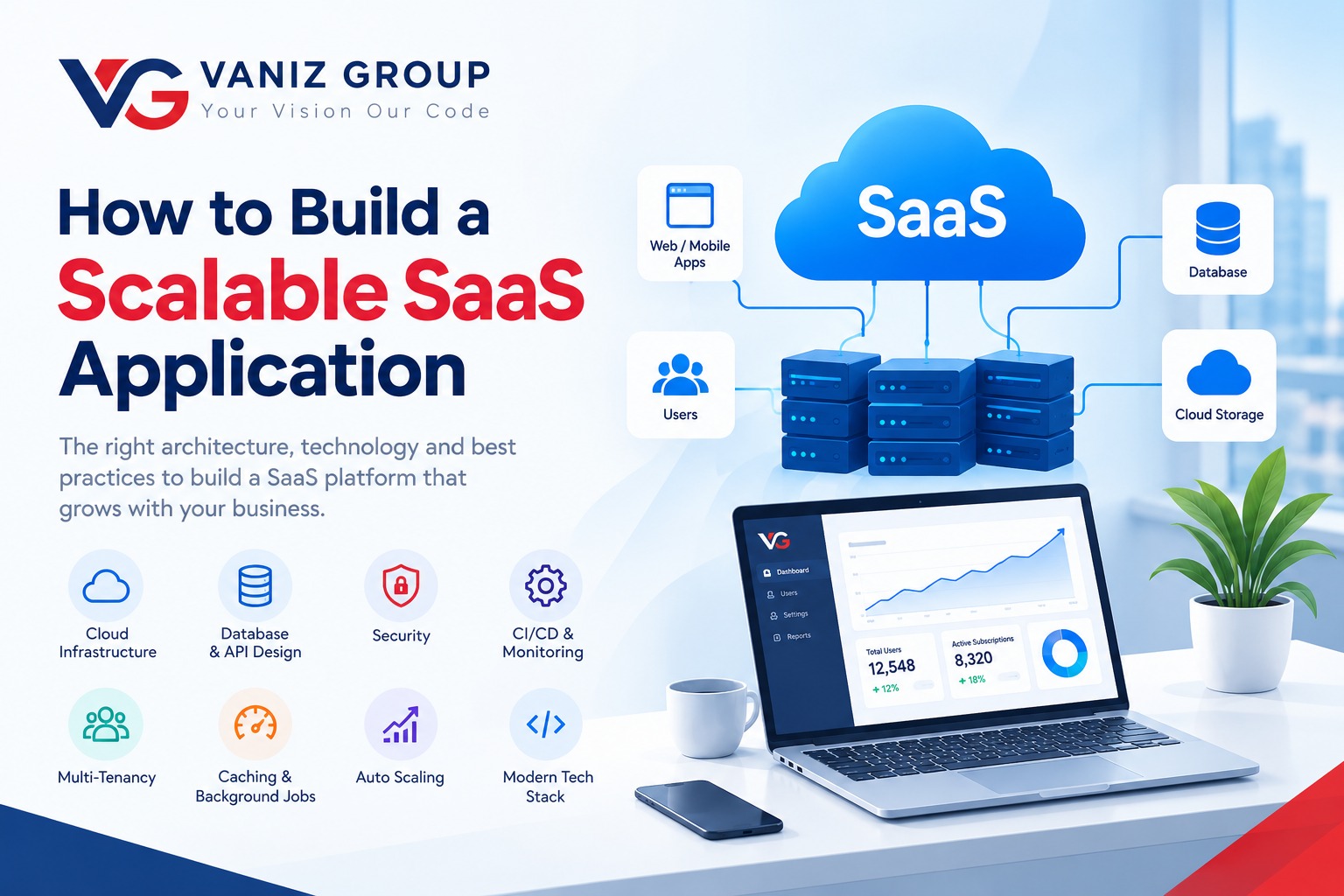
Software as a Service (SaaS) has become one of the most popular ways to deliver modern software. Instead of installing applications on individual devices or maintaining separate systems for every customer, SaaS products allow users to access software through the internet, usually through a subscription-based model.
However, building a SaaS application that works for a few hundred users is very different from building one that can reliably support thousands or millions of users.
A scalable SaaS application needs more than a good user interface. It requires the right software architecture, database strategy, security model, cloud infrastructure, monitoring, and development practices from the beginning.
In this guide, we will explore the key considerations for building a scalable SaaS application and creating a strong foundation for long-term business growth.
What Makes a SaaS Application Scalable?
Scalability is the ability of an application to handle increasing users, traffic, transactions, and data without significant performance degradation.
A scalable SaaS platform should be able to grow in areas such as:
Number of users
Number of customers or organizations
API requests
Database records
File and media storage
Background jobs
Payment transactions
Third-party integrations
The goal is not to build the most complicated architecture from day one. Instead, the goal is to create a flexible foundation that can evolve as the SaaS product grows.
1. Start With a Clear SaaS Architecture
Architecture is one of the most important decisions in SaaS development.
A typical SaaS application can include the following layers:
Frontend to API Layer to Application Services to Database
Additional components may include:
Authentication and authorization
Caching
Message queues
Background workers
File storage
Search services
Payment gateways
Analytics
Monitoring and logging
For many startups and growing businesses, a modular monolithic architecture can be a good starting point. It keeps development and deployment relatively simple while maintaining clear separation between business modules.
As the product grows, individual components can be extracted into independent services when there is a real business or technical need.
Starting with microservices simply because they are popular can introduce unnecessary complexity and increase development and infrastructure costs.
2. Design for Multi-Tenancy
Multi-tenancy is a fundamental part of many SaaS applications.
In a multi-tenant system, a single application serves multiple customers or organizations while keeping their data logically isolated.
For example, a business management SaaS platform might have:
Company A with employees, customers, and orders
Company B with employees, customers, and orders
Company C with employees, customers, and orders
There are several common approaches to SaaS multi-tenancy.
Shared Database and Shared Schema
All customers use the same database and tables, with a tenant identifier used to separate records.
This approach can be cost-effective and relatively easy to scale, but application-level data isolation must be carefully implemented.
Shared Database and Separate Schema
Each tenant has its own database schema.
This provides stronger logical separation but introduces additional database management complexity.
Separate Database Per Tenant
Each customer receives an independent database.
This provides strong isolation and can be useful for enterprise customers with specific compliance or security requirements. However, it can increase infrastructure and operational costs.
The right multi-tenant architecture depends on the product, security requirements, customer expectations, compliance requirements, and expected scale.
3. Choose the Right SaaS Technology Stack
Technology selection should be based on the application's requirements rather than current trends.
A modern SaaS technology stack could include:
Frontend Technologies
React
Angular
Vue.js
Next.js
Backend Technologies
Node.js
.NET
ASP.NET Core
Java
Spring Boot
Python
Database Technologies
PostgreSQL
MySQL
SQL Server
MongoDB
Cloud Infrastructure
Amazon Web Services
Microsoft Azure
Google Cloud
Supporting Technologies
Docker
Redis
RabbitMQ
Kubernetes
CI/CD pipelines
There is no single technology stack that is perfect for every SaaS application. The best technology stack is the one that supports the application's functional, performance, security, scalability, and business requirements.
4. Build a Strong API Layer
APIs are the communication layer between the frontend and backend of a SaaS application.
A well-designed API should provide:
Authentication
Authorization
Input validation
Rate limiting
Pagination
Error handling
API versioning
Logging
Consistent response formats
REST APIs are widely used for SaaS applications, while GraphQL can be useful for applications that require flexible data querying.
API design should also consider future integrations. A SaaS product may eventually need to connect with payment providers, CRM systems, accounting software, communication platforms, analytics tools, or other third-party services.
A well-structured API makes these integrations easier to maintain as the application grows.
5. Optimize Database Performance
As SaaS applications grow, the database can become one of the biggest performance bottlenecks.
Important database optimization practices include:
Proper Database Indexing
Indexes can significantly improve query performance when used correctly.
Efficient Database Queries
Avoid unnecessary queries and excessive data retrieval. Retrieve only the data required by the application.
Pagination
Large datasets should not be loaded into a single API request.
Instead of returning thousands of records at once, APIs should use pagination or cursor-based pagination.
Database Connection Pooling
Database connection pooling helps applications efficiently manage database connections under high traffic.
Read Replicas
For applications with heavy read traffic, database read replicas can distribute workload and reduce pressure on the primary database.
A well-designed database architecture can significantly improve SaaS application performance and scalability.
6. Introduce Caching
Caching can dramatically improve SaaS application performance.
Frequently requested data can be stored temporarily in a cache so that the application does not need to query the database repeatedly.
Common caching technologies include Redis and Memcached.
Caching can be useful for:
User sessions
Frequently accessed configuration
Product catalogs
Dashboard data
API responses
Frequently accessed reference data
However, caching needs a proper invalidation strategy. Incorrect caching can result in users seeing outdated information.
7. Use Background Jobs for Heavy Processing
Not every operation needs to happen during an HTTP request.
Tasks such as the following can be moved to background workers:
Sending emails
Generating reports
Processing large files
Sending notifications
Data synchronization
Invoice generation
Import and export operations
Message queues such as RabbitMQ or cloud-based queue services can help distribute these tasks and prevent slow operations from blocking user requests.
Background processing makes a SaaS application more responsive and easier to scale.
8. Design for Horizontal Scaling
Horizontal scaling means adding more application instances instead of continuously increasing the resources of a single server.
A basic architecture may use a single application server:
Users to Single Server to Database
With horizontal scaling, the architecture can use multiple application servers:
Users to Load Balancer to Multiple Application Servers to Database
This approach allows additional application instances to be added when traffic increases.
Cloud platforms such as AWS, Azure, and Google Cloud provide infrastructure that can support horizontal scaling.
Horizontal scaling can also improve availability because the application does not depend on a single application server.
9. Implement Strong SaaS Security
Security should be part of SaaS development from the beginning rather than something added later.
Important security measures include:
Secure authentication
Role-based access control
Multi-factor authentication where appropriate
Encryption in transit
Encryption of sensitive data
Secure password hashing
Input validation
API rate limiting
Protection against common web vulnerabilities
Secure session management
Audit logging
Regular dependency updates
For multi-tenant applications, authorization is particularly important.
A user from one organization should never be able to access another organization's data simply by modifying an ID in an API request.
Strong tenant isolation and access control are essential for building a secure SaaS platform.
10. Build Automated CI/CD Pipelines
Manual deployments become increasingly difficult as a SaaS product grows.
A CI/CD pipeline can automate processes such as:
Code commit
Automated testing
Code quality checks
Application build
Container creation
Deployment to staging
Production deployment
Automated CI/CD reduces deployment errors and allows development teams to release updates more frequently.
Infrastructure as code and automated environment configuration can further improve consistency between development, staging, and production environments.
11. Monitor Your SaaS Application
A scalable SaaS application needs strong observability.
Monitoring should provide visibility into:
Server health
API response times
Error rates
Database performance
CPU and memory usage
Queue length
Failed background jobs
User activity
Application logs
Logging, metrics, and application performance monitoring tools can help development teams identify problems before they significantly affect customers.
Monitoring becomes especially important when scaling because performance issues can be difficult to identify from user reports alone.
12. Plan for Reliable File Storage
Many SaaS platforms handle documents, images, videos, invoices, reports, or other files.
Instead of storing large files directly on application servers, cloud object storage can be used.
Examples include:
Amazon S3
Azure Blob Storage
Google Cloud Storage
Cloud object storage separates application computing from file storage and makes it easier to scale storage independently.
It can also provide better reliability and flexibility for applications that manage large amounts of customer data.
13. Build Billing and Subscription Management Carefully
For subscription-based SaaS products, billing is a core business component.
A SaaS billing system may need to support:
Monthly subscriptions
Annual subscriptions
Free trials
Plan upgrades
Plan downgrades
Usage-based billing
Coupons
Invoices
Failed payments
Subscription cancellation
Payment webhooks
Payment providers can handle many payment-related operations, while the SaaS application should maintain a reliable internal representation of customer subscriptions and entitlements.
A well-designed subscription management system helps prevent billing inconsistencies and provides a better customer experience.
14. Test for Scale Before You Need It
An application can work perfectly with 100 users and fail under 10,000 concurrent users.
Load testing and performance testing can help identify bottlenecks before they affect real customers.
Testing can evaluate:
Concurrent users
API throughput
Database performance
Response times
Background job processing
Memory usage
Failure recovery
The objective is not simply to achieve a large number of requests per second. The goal is to understand how the entire SaaS system behaves under realistic workloads.
15. Design the Application for Future Growth
Scalability is not only about infrastructure.
The codebase itself should be designed for change.
Important development practices include:
Modular architecture
Clear separation of responsibilities
Reusable components
Consistent coding standards
Automated tests
API versioning
Documentation
Centralized configuration
Proper error handling
Avoid tightly coupling every part of the application.
A flexible architecture makes it easier to introduce new features without continuously rewriting existing functionality.
A Practical Scalable SaaS Architecture
A typical scalable SaaS architecture may include:
Users
CDN or Load Balancer
Frontend Application
API Gateway or Backend APIs
Application Services
Database
Cache
Message Queue
Background Workers
External Services
Cloud Storage
Payment Systems
Monitoring and logging can operate across the entire infrastructure.
This architecture can evolve as the product grows. Additional application instances, database replicas, background workers, caching layers, or independent services can be introduced when required.
Common SaaS Development Mistakes to Avoid
Building Microservices Too Early
Microservices can be powerful, but they also introduce service communication, deployment, monitoring, and infrastructure complexity.
Start with an architecture appropriate for the current scale and evolve it when there is a genuine need.
Ignoring Multi-Tenant Security
A SaaS application must strictly control tenant-level access.
A small authorization mistake can expose sensitive customer data.
Overlooking Database Design
Poor database design can become difficult and expensive to fix after the application has accumulated large amounts of data.
Database architecture should therefore be considered early in the SaaS development process.
Relying Only on Vertical Scaling
Increasing server size can help initially, but it is not always a sustainable long-term strategy.
Applications that experience significant traffic growth should consider horizontal scaling and distributed infrastructure.
Not Implementing Monitoring
Without proper monitoring, identifying performance and reliability problems becomes much harder.
Monitoring should be implemented before major scaling problems occur.
Mixing Business Logic Everywhere
When business logic is scattered across controllers, database queries, and frontend components, maintaining and scaling the application becomes more difficult.
A clean separation of responsibilities makes the codebase easier to maintain and extend.
Final Thoughts
Building a scalable SaaS application is a combination of good product planning, software architecture, security, database engineering, cloud infrastructure, and continuous monitoring.
The most important principle is to build for growth without overengineering the product from day one.
Start with a clean and modular architecture, implement strong security and tenant isolation, optimize the database, introduce caching and background processing where necessary, automate deployments, and continuously monitor system performance.
As the number of customers grows, the architecture can evolve with the business.
A well-designed SaaS platform should not only work today. It should provide a reliable foundation for the next stage of business growth.
Looking to Build a Scalable SaaS Product?
Vaniz Group helps businesses and startups design and develop custom SaaS platforms, web applications, APIs, business systems, and cloud-based solutions.
From initial software architecture and UI/UX design to backend development, database design, third-party integrations, deployment, and ongoing improvements, Vaniz Group can help turn your SaaS idea into a production-ready application designed for long-term growth.
If you have a SaaS idea or need help scaling an existing software product, get in touch with Vaniz Group to discuss your requirements.