 Our Client Reviews

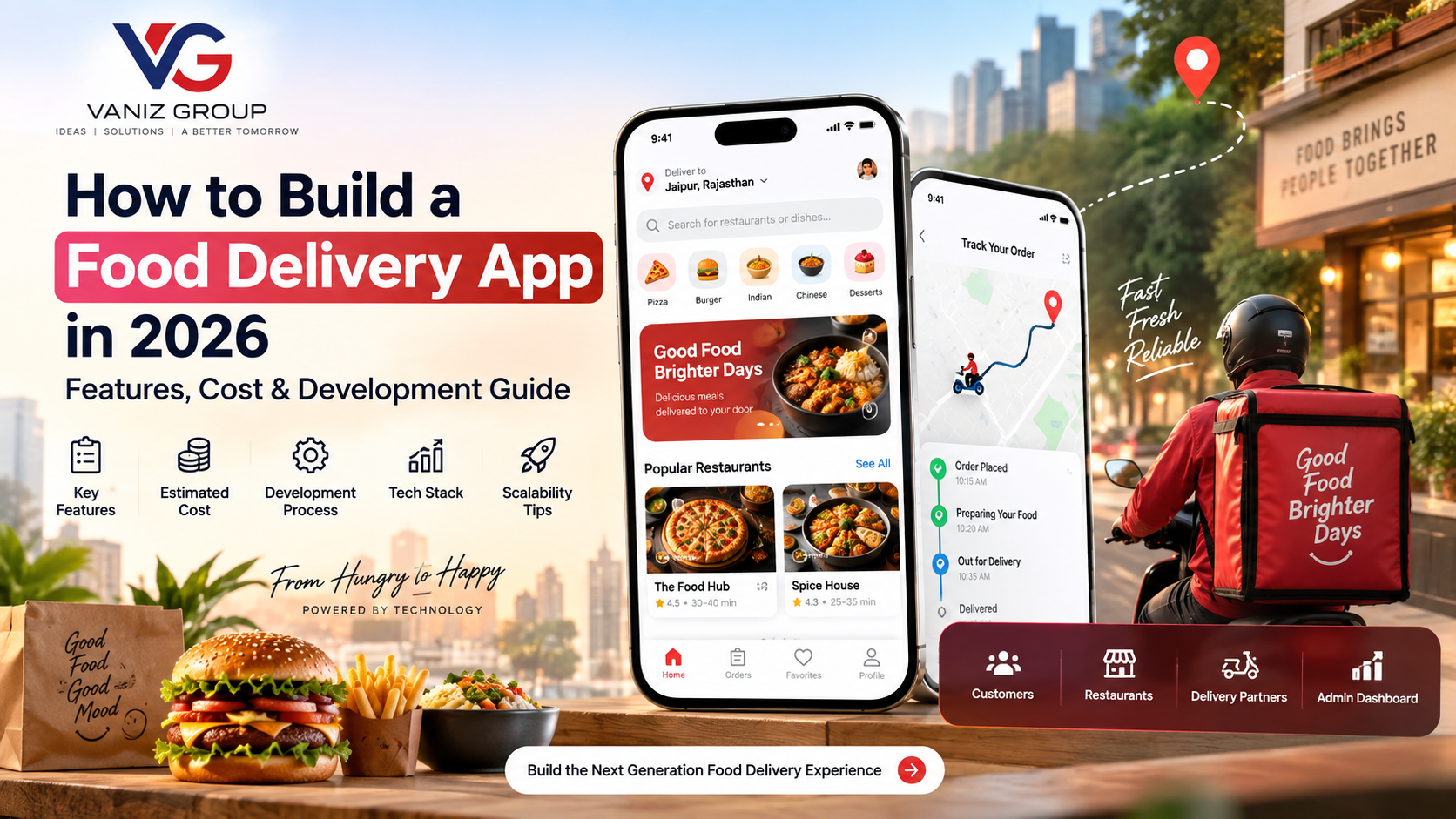
Food delivery has become an important part of the digital restaurant and food-service industry. Customers increasingly expect to discover restaurants, browse menus, place orders, make secure payments, and track deliveries from their smartphones.
For entrepreneurs, restaurant chains, food businesses, and technology companies, building a food delivery app can create a complete digital ordering ecosystem connecting customers, restaurants, delivery partners, and administrators.
However, developing a successful food delivery platform requires more than a customer-facing mobile application. A complete solution may include a customer app, restaurant panel, delivery partner app, admin dashboard, backend APIs, payment integration, location services, real-time order tracking, notifications, and analytics.
In this guide, we explain how to build a food delivery app in 2026, including essential features, technology stack, development process, estimated cost, timeline, challenges, and scalability considerations.
What Is a Food Delivery App?
A food delivery app is a digital platform that allows customers to discover restaurants or food businesses, browse menus, order food, make payments, and track deliveries.
Depending on the business model, the platform can support:
Individual restaurants
Restaurant chains
Multiple restaurants
Cloud kitchens
Local food businesses
Grocery and food retailers
Delivery partners
A multi-vendor food delivery marketplace generally consists of four major components:
Customer App
Restaurant Panel
Delivery Partner App
Admin Dashboard
All components communicate with a centralized backend that manages restaurants, menus, orders, payments, delivery assignments, notifications, and other business operations.
How Does a Food Delivery App Work?
The typical food ordering process works as follows:
The customer opens the application.
The app detects or receives the delivery location.
Available restaurants are displayed.
The customer searches or browses restaurants.
The customer selects a restaurant and views its menu.
Food items are added to the cart.
The customer selects delivery and payment options.
The order is placed.
The restaurant receives the order.
The restaurant accepts and prepares the food.
A delivery partner is assigned.
The delivery partner collects the order.
The customer tracks the delivery.
The order is delivered.
Payment and order status are finalized.
The customer can rate the restaurant and delivery experience.
Behind this workflow, several backend services work together to coordinate customers, restaurants, delivery partners, payments, and real-time order information.
Key Features of a Food Delivery App
1. Customer Registration and Login
Customers should be able to create accounts quickly using:
Phone number
Email
OTP verification
Password
Social login where appropriate
The customer profile can contain:
Personal information
Saved addresses
Previous orders
Favorite restaurants
Favorite food items
Payment preferences
Coupons
Loyalty information
2. Location-Based Restaurant Discovery
Location is one of the most important features of a food delivery application.
The platform can use location services to identify restaurants that deliver to a customer's area.
Users can search based on:
Current location
City
Area
Postal code
Saved address
Manually selected location
Map integration can also help customers select and confirm their delivery address.
3. Restaurant Search
Customers should be able to search for restaurants and food items.
Search functionality can support:
Restaurant name
Cuisine
Food item
Location
Categories
Dietary preferences
For larger platforms, search should be optimized so users can quickly find relevant restaurants and dishes.
4. Filters and Sorting
Filters make it easier for customers to find suitable restaurants.
Common filters include:
Cuisine
Price range
Rating
Delivery time
Distance
Offers
Vegetarian options
Dietary preferences
Open restaurants
Sorting can include:
Popularity
Rating
Delivery time
Price
Distance
5. Restaurant Profile
Every restaurant should have a detailed profile.
It can include:
Restaurant name
Images
Description
Address
Opening hours
Cuisine type
Ratings
Reviews
Delivery fee
Estimated delivery time
Offers
Menu
This gives customers the information they need before placing an order.
6. Digital Menu
The restaurant menu should provide a clear view of available food items.
Each item can include:
Food name
Description
Image
Price
Ingredients
Add-ons
Variations
Availability
Dietary information
Restaurants should be able to update menus through their management panel.
7. Cart and Customization
Customers should be able to customize their orders before checkout.
For example:
Select size
Add toppings
Remove ingredients
Select extras
Choose quantity
Add special instructions
The cart should automatically calculate the order subtotal and applicable charges.
8. Secure Online Payments
A food delivery application should provide secure payment options suitable for its target market.
Possible options include:
Credit cards
Debit cards
Digital wallets
Bank payments
Local payment methods
Cash on delivery where supported
The system should handle payment confirmation, failed transactions, refunds, and transaction records.
9. Order Management
Customers should have access to their complete order history.
They can view:
Current orders
Previous orders
Order details
Payment status
Delivery status
Receipts
Cancelled orders
A reorder feature can also allow customers to quickly order previously purchased meals.
10. Real-Time Order Tracking
Real-time tracking can show customers the progress of their order.
For example:
Order Confirmed → Food Preparing → Ready for Pickup → Out for Delivery → Delivered
When a delivery partner is assigned, customers can also receive information about the delivery and track the driver's location where supported.
11. Push Notifications
Notifications keep customers informed throughout the ordering process.
Examples include:
Order confirmation
Restaurant acceptance
Food preparation
Delivery assignment
Driver arrival
Order pickup
Delivery updates
Payment confirmation
Promotional offers
12. Ratings and Reviews
Customers can rate restaurants and their delivery experience after an order.
The platform can support:
Star ratings
Written reviews
Food ratings
Delivery ratings
Restaurant feedback
Review moderation tools should also be available to administrators.
Restaurant Panel Features
A multi-restaurant platform needs a dedicated restaurant dashboard.
Restaurant owners should be able to manage:
Restaurant Profile
Business information
Address
Opening hours
Contact information
Delivery area
Menu Management
Categories
Food items
Prices
Images
Add-ons
Availability
Order Management
New orders
Accepted orders
Preparing orders
Ready orders
Completed orders
Cancelled orders
Promotions
Restaurants can create or participate in:
Discounts
Special offers
Coupon campaigns
Combo deals
Reports
The dashboard can provide information about:
Orders
Revenue
Popular dishes
Cancellations
Customer activity
Restaurant performance
Delivery Partner App Features
The delivery partner application handles the delivery workflow.
Important features include:
Driver registration
Profile management
Document submission
Online/offline status
Order notifications
Delivery requests
Accept/reject order
Navigation
Pickup information
Customer information
Delivery confirmation
Earnings
Order history
Ratings
Notifications
The application should make it easy for delivery partners to manage multiple delivery tasks while maintaining accurate order statuses.
Admin Dashboard Features
The admin panel provides centralized control over the entire food delivery platform.
Administrators can manage:
Customers
Restaurants
Delivery partners
Orders
Payments
Refunds
Coupons
Promotions
Reviews
Categories
Delivery zones
Commissions
Notifications
Reports
Analytics
A real-time dashboard can also display active orders, restaurants, delivery partners, cancellations, and other operational information.
Advanced Features for a Food Delivery App
After launching the core platform, businesses can introduce additional functionality.
Multiple Restaurant Ordering
Allow customers to discover and order from multiple restaurants through one platform.
Scheduled Food Delivery
Customers can schedule an order for a future date and time.
This can be useful for:
Office lunches
Events
Parties
Corporate catering
Family occasions
Loyalty Programs
Businesses can reward repeat customers with:
Points
Discounts
Memberships
Special offers
In-App Wallet
An integrated wallet can allow customers to maintain a balance and use it for future orders.
Subscription Plans
A platform can offer subscription programs that may include benefits such as reduced delivery fees or special offers.
AI-Powered Recommendations
AI can be used to analyze customer activity and provide personalized restaurant or food recommendations.
Multi-Branch Restaurant Support
Restaurant chains can manage multiple locations from a centralized system.
Corporate Food Ordering
Businesses can create corporate accounts and manage employee meal orders.
How to Build a Food Delivery App
1. Define Your Business Model
Before development begins, determine how the platform will operate.
Possible models include:
Single restaurant app
Restaurant marketplace
Cloud kitchen platform
Restaurant chain application
Local food delivery service
Corporate food ordering platform
Your business model will determine the required features and architecture.
2. Research Your Target Market
Identify your target users and geographical market.
Research:
Customer expectations
Restaurant requirements
Delivery operations
Pricing models
Payment preferences
Delivery zones
Competitors
Local regulations
This research can help determine which features should be included in the initial MVP.
3. Define the MVP
Instead of building every feature immediately, begin with the essential functionality.
A basic food delivery MVP could include:
Customer registration
Restaurant discovery
Search and filters
Restaurant profiles
Digital menus
Cart
Checkout
Payments
Order management
Delivery tracking
Restaurant panel
Delivery partner app
Admin dashboard
Advanced features can be added after validating the product.
4. Design the UI/UX
The application should provide a simple ordering experience.
Important customer screens include:
Login
Home
Location selection
Restaurant listing
Search
Restaurant details
Menu
Food details
Cart
Checkout
Payment
Order tracking
Order history
Profile
Restaurant and delivery applications require their own optimized interfaces.
5. Choose the Technology Stack
A possible technology stack for a food delivery application includes:
Mobile Development
Flutter
React Native
Native Android
Native iOS
Web Application
React
Angular
Next.js
Backend
Node.js
ASP.NET Core
Java / Spring Boot
Database
PostgreSQL
MySQL
SQL Server
MongoDB where appropriate
Cloud Infrastructure
AWS
Microsoft Azure
Docker
CI/CD
Real-Time Communication
WebSockets
Push notification services
Real-time messaging infrastructure
The technology stack should be selected according to the project's expected traffic, features, integrations, development requirements, and future scalability.
6. Develop the Backend
The backend controls the core business logic of the application.
It can manage:
Customers
Restaurants
Menus
Food items
Orders
Delivery partners
Payments
Coupons
Reviews
Notifications
Commissions
Analytics
A properly designed API architecture allows the customer app, restaurant dashboard, delivery app, and admin panel to communicate with the same platform.
7. Integrate Maps and Location Services
Maps and location services are important for:
Address selection
Restaurant discovery
Delivery zones
Driver navigation
Distance calculation
Estimated delivery time
Real-time delivery tracking
Location-related features should be designed carefully to balance accuracy, performance, battery usage, and infrastructure costs.
8. Implement Order and Delivery Management
The backend should maintain a reliable order lifecycle.
For example:
Order Placed → Restaurant Accepted → Preparing → Ready → Delivery Assigned → Picked Up → Out for Delivery → Delivered
Every status change should be synchronized between the relevant applications.
9. Integrate Payment Gateway
Payment integration should support the required payment methods for your target market.
The backend should handle:
Payment initiation
Payment confirmation
Failed transactions
Refunds
Webhooks
Transaction records
Restaurant settlements
Delivery partner payments
Platform commissions
10. Test the Application
Testing should cover all major components.
Important testing areas include:
Functional testing
API testing
Payment testing
Location testing
Real-time tracking
Security testing
Performance testing
Load testing
Mobile compatibility
Restaurant workflow
Delivery workflow
Special attention should be given to simultaneous orders and changes in restaurant or delivery partner availability.
11. Launch the Application
After development and testing, deploy the backend infrastructure and publish the mobile applications.
Before launch, configure:
Analytics
Error monitoring
Server monitoring
Database backups
Security controls
Notification services
Payment services
12. Scale and Improve
After launch, monitor how customers, restaurants, and delivery partners use the platform.
Future improvements can include:
AI recommendations
Loyalty programs
Subscription plans
Advanced analytics
Multiple payment methods
Multi-language support
Multi-currency support
Multi-branch management
Corporate ordering
How Much Does It Cost to Build a Food Delivery App in 2026?
The food delivery app development cost depends on the number of applications, features, integrations, design complexity, backend architecture, geographical market, and development team.
As a broad planning estimate:
Platform Type | Estimated Development Cost |
|---|---|
Basic Food Delivery MVP | $15,000 – $30,000 |
Medium Multi-Restaurant Platform | $30,000 – $70,000 |
Advanced Food Delivery Marketplace | $70,000 – $150,000+ |
These figures are general planning ranges, not fixed quotations.
The final cost can increase when the application requires sophisticated delivery management, advanced analytics, multiple payment systems, complex restaurant integrations, loyalty programs, AI features, multiple countries, or large-scale infrastructure.
For many businesses, developing an MVP first can be a practical way to validate the concept before investing in advanced functionality.
How Long Does It Take to Build a Food Delivery App?
The development timeline depends on the scope and complexity of the platform.
A basic MVP may take approximately 3–5 months, while a larger multi-vendor food delivery marketplace can require 6–12 months or more.
The development process generally includes:
Business analysis
UI/UX design
Customer app development
Restaurant panel development
Delivery partner app development
Backend development
Admin dashboard
API integrations
Payment integration
Testing
Deployment
The timeline can vary considerably depending on the number of platforms and integrations.
Common Challenges in Food Delivery App Development
Real-Time Order Management
Orders can move through multiple stages, so all participants need accurate and timely status updates.
Delivery Partner Assignment
The system needs to identify suitable delivery partners based on location, availability, order requirements, and operational rules.
Restaurant Availability
Restaurants may open, close, pause orders, change menus, or run out of specific food items. The platform should be able to reflect these changes.
Dynamic Delivery Fees
Delivery charges may depend on distance, location, time, promotions, or other business rules.
Payment and Refunds
Failed payments, cancellations, partial refunds, and restaurant settlements require carefully designed transaction workflows.
Scalability
As order volume increases, restaurant searches, order requests, notifications, location updates, and payment transactions can place significant demand on backend infrastructure.
Security
The platform should protect customer accounts, restaurant accounts, delivery information, payment-related data, APIs, and administrative functionality using appropriate security measures.
How to Make Your Food Delivery App Stand Out
A food delivery platform can differentiate itself by focusing on a specific market or customer need.
Potential approaches include:
Local restaurant discovery
Faster delivery
Restaurant-exclusive menus
Corporate food ordering
Healthy food delivery
Meal subscriptions
Cloud kitchen ordering
Regional cuisine
Loyalty programs
Personalized recommendations
Multi-restaurant ordering
Better restaurant management tools
Transparent delivery pricing
Instead of attempting to replicate every feature of a large marketplace, businesses can focus on a specific customer segment and develop features around its requirements.
Food Delivery App Revenue Models
A food delivery business can use one or multiple revenue models.
Restaurant Commission
The platform charges restaurants a percentage or agreed fee on completed orders.
Delivery Fee
Customers may pay a delivery charge based on distance or other business rules.
Advertising
Restaurants can pay to promote their listings or offers within the platform.
Subscription
Customers or restaurants can subscribe to premium plans.
Featured Listings
Restaurants can pay for increased visibility within search and discovery areas.
Service Fees
The platform may apply additional service charges depending on its business model and applicable requirements.
Final Thoughts
Building a food delivery app in 2026 requires a complete technology ecosystem rather than just a mobile application.
A successful platform may require a customer app, restaurant management system, delivery partner app, admin dashboard, scalable backend, payment integration, location services, real-time order tracking, notifications, and analytics.
Starting with a focused MVP can help businesses validate their concept and control initial development costs. As the platform grows, advanced capabilities such as AI-powered recommendations, loyalty programs, subscriptions, corporate ordering, multi-branch management, and advanced analytics can be introduced.
Whether you want to build a local food delivery application, multi-restaurant marketplace, restaurant ordering system, cloud kitchen platform, or custom food technology solution, selecting the right architecture and development strategy from the beginning can make future expansion easier.
Build Your Food Delivery App With Vaniz Group
At Vaniz Group, we help businesses turn food technology ideas into scalable digital products.
Our capabilities include mobile app development, web application development, backend development, API development and integration, payment gateway integration, real-time applications, cloud solutions, AI automation, CRM/ERP development, and custom software development.
If you are planning to build a food delivery app, restaurant ordering platform, multi-vendor food marketplace, delivery management system, or custom restaurant technology solution, Vaniz Group can help with product planning, UI/UX design, development, third-party integrations, deployment, and future scaling.
Have a food delivery app idea? Contact Vaniz Group to discuss your project and development requirements.