 Our Client Reviews


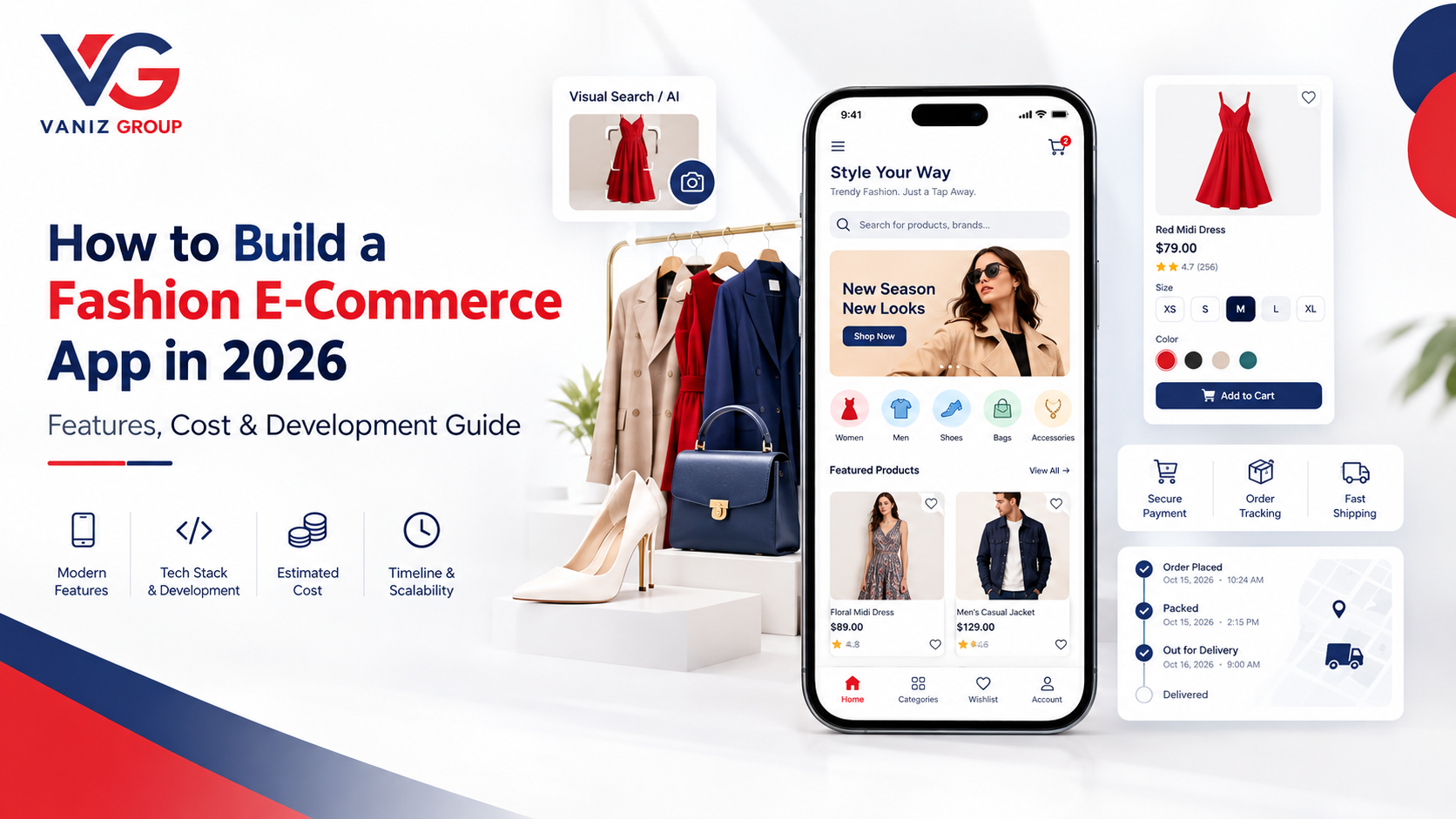
The fashion industry has rapidly moved toward digital shopping, with customers expecting a convenient way to discover clothing, compare products, check sizes, place orders, and track deliveries from their smartphones.
A fashion e-commerce app can help clothing brands, fashion retailers, boutiques, designers, and entrepreneurs create a direct digital shopping channel. With the right technology, businesses can offer personalized product discovery, secure payments, real-time inventory, order management, promotions, and seamless customer experiences.
However, building a successful fashion shopping application requires more than displaying product images. A complete platform needs product management, categories and filters, size and color variants, inventory synchronization, payments, order processing, shipping integration, notifications, customer accounts, and an administration system.
In this guide, we explain how to build a fashion e-commerce app in 2026, including its key features, development process, technology stack, estimated cost, timeline, challenges, and scalability considerations.
What Is a Fashion E-Commerce App?
A fashion e-commerce app is a mobile or web application that allows customers to browse, discover, purchase, and manage orders for fashion products.
Depending on the business model, the application can sell:
Clothing
Shoes
Bags
Accessories
Jewelry
Watches
Sportswear
Beauty and fashion products
Designer collections
Custom or boutique products
A fashion e-commerce platform can be developed for a single brand, a fashion retailer, or a multi-vendor marketplace.
A complete solution may include:
Customer Mobile App
Admin Dashboard
Seller or Vendor Panel
Backend and API Infrastructure
For a single-brand fashion store, the seller panel may not be required, while a marketplace with multiple fashion sellers will generally need dedicated vendor management.
How Does a Fashion E-Commerce App Work?
The typical shopping journey looks like this:
A customer opens the application.
Products and fashion categories are displayed.
The customer searches or browses products.
Filters and sorting options help narrow the results.
The customer opens a product page.
They select size, color, quantity, or other variants.
The product is added to the cart.
The customer enters or selects a delivery address.
A payment method is selected.
The order is placed.
The seller or warehouse receives the order.
The product is packed and shipped.
The customer receives order updates.
The customer tracks the shipment.
The order is delivered.
The customer can provide a rating or review.
Behind this simple experience, the backend manages inventory, product variants, payments, orders, shipping, customer information, promotions, and notifications.
Key Features of a Fashion E-Commerce App
1. Customer Registration and Login
Customers should be able to create an account quickly.
Possible login methods include:
Email
Phone number
OTP
Password
Social login where appropriate
Customer accounts can contain:
Personal information
Saved addresses
Order history
Wishlist
Saved payment preferences
Product reviews
Loyalty points
Coupons
Guest checkout can also be considered to reduce friction for first-time customers.
2. Fashion Categories
Organizing products into clear categories makes product discovery easier.
Categories may include:
Men's Fashion
Women's Fashion
Kids' Fashion
Shoes
Accessories
Bags
Jewelry
Watches
Sportswear
Seasonal Collections
Businesses can create subcategories based on their catalog.
For example:
Women's Fashion → Dresses → Evening Dresses
This structure can also help improve navigation and product organization.
3. Product Search
A powerful search system is essential for fashion e-commerce.
Customers should be able to search by:
Product name
Brand
Category
Style
Color
Material
Collection
Advanced search can also consider product attributes and synonyms to help customers discover relevant items.
4. Filters and Sorting
Fashion stores often have large product catalogs, making filters particularly important.
Customers can filter products by:
Size
Color
Price
Brand
Category
Material
Rating
Availability
Style
Discount
Collection
Sorting options can include:
New arrivals
Popular products
Price: low to high
Price: high to low
Highest rated
Recommended
5. Detailed Product Pages
A product page should provide enough information for customers to make a purchasing decision.
It can include:
High-quality product images
Product name
Price
Discount
Description
Available sizes
Available colors
Material
Product specifications
Size guide
Stock availability
Customer reviews
Related products
Multiple product images can show the item from different angles.
6. Size and Color Variants
Fashion products often have multiple combinations of sizes and colors.
For example:
T-Shirt
Black — S
Black — M
Black — L
White — S
White — M
White — L
The inventory system should track each variant independently.
This prevents customers from ordering a size or color that is no longer available.
7. Size Guide
A size guide can reduce uncertainty when purchasing clothing online.
The application can provide measurements for:
Chest
Waist
Hip
Shoulder
Sleeve
Length
Businesses can create different size charts for different categories, brands, regions, or product types.
8. Wishlist
Customers can save products they are interested in for later.
Wishlist functionality can help customers:
Save products
Compare future purchases
Receive stock notifications
Receive price-drop notifications
Return to products later
9. Shopping Cart
The cart should display:
Products
Selected variants
Quantity
Price
Discounts
Taxes where applicable
Shipping charges
Final total
Customers should also be able to update quantities or remove products before checkout.
10. Secure Checkout
A streamlined checkout experience is important for e-commerce.
The checkout process can include:
Delivery address
Shipping option
Coupon
Payment method
Order summary
Order confirmation
Reducing unnecessary steps can make the purchasing process more convenient.
11. Payment Gateway Integration
Fashion e-commerce applications can support payment methods appropriate for their target market.
These may include:
Credit cards
Debit cards
Digital wallets
Bank payments
Local payment methods
Cash on delivery where supported
The backend should securely handle payment confirmation, failed transactions, refunds, and transaction records.
12. Order Management
Customers should be able to view and manage their orders.
Order information can include:
Order number
Products
Quantity
Payment status
Shipping status
Delivery address
Estimated delivery
Invoice
Cancellation status
Customers can also receive updates as the order progresses.
13. Shipment Tracking
Shipping integration allows customers to follow their orders after dispatch.
Possible statuses include:
Order Confirmed → Processing → Packed → Shipped → Out for Delivery → Delivered
The application can synchronize tracking information with shipping or logistics services where integrations are available.
14. Reviews and Ratings
Customers can review products after purchasing them.
Reviews can include:
Star ratings
Written feedback
Product-specific reviews
Images where appropriate
Size or fit feedback
Review moderation tools should also be available to administrators.
15. Push Notifications
Notifications can keep customers informed about important activities.
Examples include:
Order confirmation
Payment confirmation
Order shipment
Delivery updates
Price drops
Back-in-stock alerts
Promotional offers
New collections
Abandoned cart reminders
Businesses should provide appropriate controls so customers can manage promotional notifications.
Advanced Features for a Fashion E-Commerce App
Once the core platform is established, businesses can add advanced functionality.
AI-Powered Product Recommendations
AI can analyze customer interactions and product information to recommend relevant products.
For example, the application could suggest:
Similar products
Frequently purchased combinations
Complementary accessories
Personalized collections
Visual Search
Customers can upload or select an image and search for visually similar fashion products.
This can create a more engaging product discovery experience.
Virtual Try-On
Depending on the product category and available technology, augmented reality or computer vision can be used to provide virtual visualization experiences.
Personalized Shopping
The application can personalize:
Homepage products
Product recommendations
Offers
Collections
Search results
AI Fashion Assistant
An AI assistant can help customers discover products based on requirements such as:
Occasion
Budget
Style
Color
Season
Preferred clothing type
Loyalty Program
Businesses can introduce:
Loyalty points
Membership tiers
Rewards
Exclusive offers
Referral programs
Multi-Vendor Marketplace
A marketplace can allow multiple fashion brands or sellers to list and sell products through the same platform.
Seller Panel Features
If you are building a multi-vendor fashion marketplace, sellers need their own dashboard.
They can manage:
Product Management
Add products
Update descriptions
Upload images
Add sizes
Add colors
Set prices
Manage variants
Inventory
Stock levels
Variant availability
Low-stock alerts
Inventory updates
Order Management
New orders
Processing orders
Shipping
Completed orders
Returns
Cancellations
Sales Management
Revenue
Orders
Product performance
Commission information
A well-designed seller panel can make marketplace operations easier to manage as the number of vendors increases.
Admin Dashboard Features
The admin dashboard provides centralized control over the application.
Administrators can manage:
Customers
Products
Categories
Brands
Sellers
Inventory
Orders
Payments
Coupons
Discounts
Reviews
Returns
Shipping
Notifications
Reports
Analytics
An analytics dashboard can provide information about sales, popular products, customer activity, conversion, and inventory performance.
How to Build a Fashion E-Commerce App
1. Define Your Business Model
Start by deciding what type of fashion platform you want to build.
Possible models include:
Single-brand fashion store
Online boutique
Fashion marketplace
Designer marketplace
Luxury fashion platform
Fashion subscription platform
Custom clothing store
Multi-brand retailer
This decision affects the architecture and feature requirements.
2. Research Your Target Market
Before development, research:
Target customers
Product categories
Competitors
Pricing
Customer expectations
Payment preferences
Shipping requirements
Return policies
Geographic markets
Understanding the target audience helps determine which features should be included in the MVP.
3. Plan the MVP
An MVP can focus on the core shopping experience.
A basic fashion e-commerce MVP could include:
Customer registration
Product catalog
Search
Filters
Product details
Size and color variants
Wishlist
Cart
Checkout
Payment gateway
Order management
Shipping tracking
Notifications
Admin dashboard
Advanced AI, personalization, visual search, and other functionality can be introduced later.
4. Design the UI/UX
Fashion applications are highly visual, so the design should give sufficient attention to product photography and browsing.
Important screens include:
Splash screen
Login
Home
Categories
Search
Product listing
Product details
Size guide
Wishlist
Cart
Checkout
Payment
Order tracking
Order history
Profile
The design should also provide a consistent experience across mobile devices.
5. Choose the Technology Stack
A possible technology stack for a fashion e-commerce application includes:
Mobile App
Flutter
React Native
Native Android
Native iOS
Web Application
React
Angular
Next.js
Backend
Node.js
ASP.NET Core
Java / Spring Boot
Database
PostgreSQL
MySQL
SQL Server
MongoDB where appropriate
Cloud
AWS
Microsoft Azure
Docker
CI/CD
APIs and Integrations
Payment APIs
Shipping APIs
Product search services
Notification services
Analytics services
Authentication services
The final stack should be selected based on the application's functionality, expected traffic, integrations, development requirements, and future scalability.
6. Develop the Backend
The backend handles the core business logic.
It can manage:
Customers
Products
Product variants
Categories
Inventory
Orders
Payments
Discounts
Shipping
Reviews
Notifications
Sellers
Commissions
Analytics
A scalable API architecture allows mobile applications, websites, seller panels, and admin dashboards to communicate with the same platform.
7. Build Inventory Management
Inventory is particularly important in fashion because products may have many size and color combinations.
For example, instead of tracking only:
Blue Shirt — 100 units
the system may need to track:
Blue / Small — 15
Blue / Medium — 30
Blue / Large — 35
Blue / XL — 20
Variant-level inventory management helps reduce overselling and keeps product availability accurate.
8. Integrate Payment and Shipping Services
Payment and logistics integrations should be implemented according to the target market.
The platform should support appropriate workflows for:
Payments
Payment failures
Refunds
Order cancellation
Shipping
Tracking
Returns
Delivery confirmation
These integrations should be tested carefully before launch.
9. Implement Search and Recommendations
As the product catalog grows, search performance becomes increasingly important.
A well-designed search system can help customers discover products based on:
Keywords
Categories
Brands
Product attributes
Price
Availability
Recommendation systems can then provide personalized product suggestions.
10. Test the Application
Testing should cover the complete shopping journey.
Important testing areas include:
Functional testing
UI testing
API testing
Payment testing
Inventory testing
Search testing
Performance testing
Security testing
Cross-device testing
Load testing
Test scenarios should include out-of-stock products, failed payments, simultaneous orders, cancelled orders, refunds, and different product variants.
11. Launch and Monitor
Before launch, configure:
Production infrastructure
Analytics
Error monitoring
Database backups
Security controls
Payment services
Shipping integrations
Notification services
After launch, monitor application performance, customer behavior, order processing, payment failures, and infrastructure health.
12. Scale the Platform
As the number of customers and products increases, the application may need improvements such as:
Database optimization
Caching
CDN integration
Search optimization
Background processing
Horizontal scaling
Image optimization
Cloud infrastructure improvements
A scalable architecture makes it easier to accommodate increasing traffic and transaction volume.
How Much Does It Cost to Build a Fashion E-Commerce App in 2026?
The fashion e-commerce app development cost depends on the number of platforms, product catalog complexity, design, integrations, payment systems, marketplace functionality, and advanced features.
As a broad planning estimate:
Platform Type | Estimated Development Cost |
|---|---|
Basic Fashion E-Commerce MVP | $12,000 – $25,000 |
Medium Fashion Shopping Platform | $25,000 – $60,000 |
Advanced Fashion Marketplace | $60,000 – $120,000+ |
These are general planning ranges rather than fixed development quotes.
The final development cost can increase if the platform requires:
Multi-vendor functionality
AI recommendations
Visual search
Virtual try-on
Multiple countries
Multiple currencies
Complex shipping integrations
Advanced analytics
Loyalty systems
Subscription functionality
Custom ERP or inventory integrations
The most suitable approach depends on the business model and the features required for the first launch.
How Long Does It Take to Build a Fashion E-Commerce App?
The development timeline depends on the project's complexity.
A basic fashion e-commerce MVP may take approximately 3–5 months, while a larger multi-vendor platform with advanced functionality may require 6–12 months or more.
The development process generally includes:
Business analysis
UI/UX design
Mobile development
Web development
Backend development
Admin dashboard
Payment integration
Shipping integration
Testing
Deployment
Adding advanced AI, AR, personalization, marketplace functionality, or complex third-party integrations can extend the timeline.
Common Challenges in Fashion E-Commerce App Development
Managing Product Variants
Fashion products often have multiple sizes, colors, materials, and styles. Inventory must be managed at the appropriate variant level.
Product Photography and Performance
Fashion applications rely heavily on high-quality images. Images need to look good while also being optimized for mobile performance and bandwidth.
Returns and Exchanges
Fashion businesses often need flexible workflows for returns, exchanges, refunds, and size changes.
Inventory Synchronization
If products are sold through multiple channels, inventory synchronization becomes increasingly important.
Search and Discovery
Large catalogs require efficient search, filtering, categorization, and recommendation systems.
Payment Security
Payment transactions and customer information need appropriate security controls and reliable payment workflows.
Scalability
As product catalogs, customers, and order volumes grow, backend infrastructure must be capable of handling increasing traffic.
How to Make Your Fashion E-Commerce App Stand Out
Instead of competing only on product quantity, businesses can focus on creating a differentiated shopping experience.
Potential strategies include:
Personalized recommendations
Curated collections
AI fashion assistants
Visual search
Virtual try-on
Style-based discovery
Loyalty programs
Exclusive collections
Sustainable fashion categories
Faster delivery
Personalized offers
Better size guidance
Social shopping features
A focused product experience can help a new fashion platform establish a clear identity in its target market.
Fashion E-Commerce App Revenue Models
A fashion e-commerce platform can use different revenue models depending on its business structure.
Product Sales
The business earns revenue from direct product sales.
Marketplace Commission
A multi-vendor platform can charge sellers a commission on completed transactions.
Seller Subscription
Vendors can be offered paid plans with different marketplace features.
Featured Products
Sellers can pay for promotional placement or increased visibility where appropriate.
Membership Programs
Customers can subscribe to premium programs that provide benefits defined by the business.
Advertising
Brands and sellers can pay to promote products or collections within the platform.
Final Thoughts
Building a fashion e-commerce app in 2026 requires a combination of e-commerce functionality, attractive UI/UX, product management, inventory control, secure payments, shipping integration, and scalable backend technology.
A successful fashion platform should make it easy for customers to discover products, understand sizes and variants, complete purchases, and track their orders.
Businesses can begin with an MVP containing core shopping functionality and gradually introduce advanced capabilities such as AI-powered recommendations, visual search, virtual try-on, personalized shopping, loyalty programs, and multi-vendor functionality.
Whether you are launching a fashion brand, online boutique, multi-brand store, designer marketplace, or custom fashion shopping platform, choosing the right development architecture can provide a strong foundation for future growth.
Build Your Fashion E-Commerce App With Vaniz Group
At Vaniz Group, we help businesses transform e-commerce ideas into scalable digital products.
Our capabilities include mobile app development, web development, custom software development, API development and integration, payment gateway integration, cloud solutions, AI automation, CRM/ERP development, and e-commerce application development.
If you are planning to build a fashion e-commerce app, online clothing store, fashion marketplace, boutique shopping app, multi-vendor fashion platform, or custom e-commerce solution, Vaniz Group can help with product planning, UI/UX design, development, integrations, deployment, and future scaling.
Have a fashion e-commerce app idea? Contact Vaniz Group to discuss your project and development requirements.