 Our Client Reviews


Running a growing business often means dealing with repetitive tasks, scattered information, manual data entry, spreadsheets, emails, approvals, follow-ups, and multiple disconnected tools. While these processes may work when a company is small, they can become expensive and difficult to manage as operations grow.
Custom business software can help automate these processes, connect different departments, centralize business data, and reduce the amount of manual work required.
In this guide, we’ll explain how to automate your business with custom software in 2026, what processes you can automate, which features to include, how the development process works, what it can cost, and when custom software makes sense for your business.
What Is Business Automation With Custom Software?
Business automation means using software to perform repetitive or rule-based business tasks automatically instead of requiring employees to handle every step manually.
Custom software takes this further by being designed around your company's specific workflows.
For example, instead of employees manually:
Entering customer information
Updating spreadsheets
Sending follow-up emails
Creating invoices
Assigning tasks
Checking inventory
Generating reports
Updating multiple systems
Approving requests
A custom platform can automate these activities based on predefined rules and business processes.
A typical automated workflow could look like:
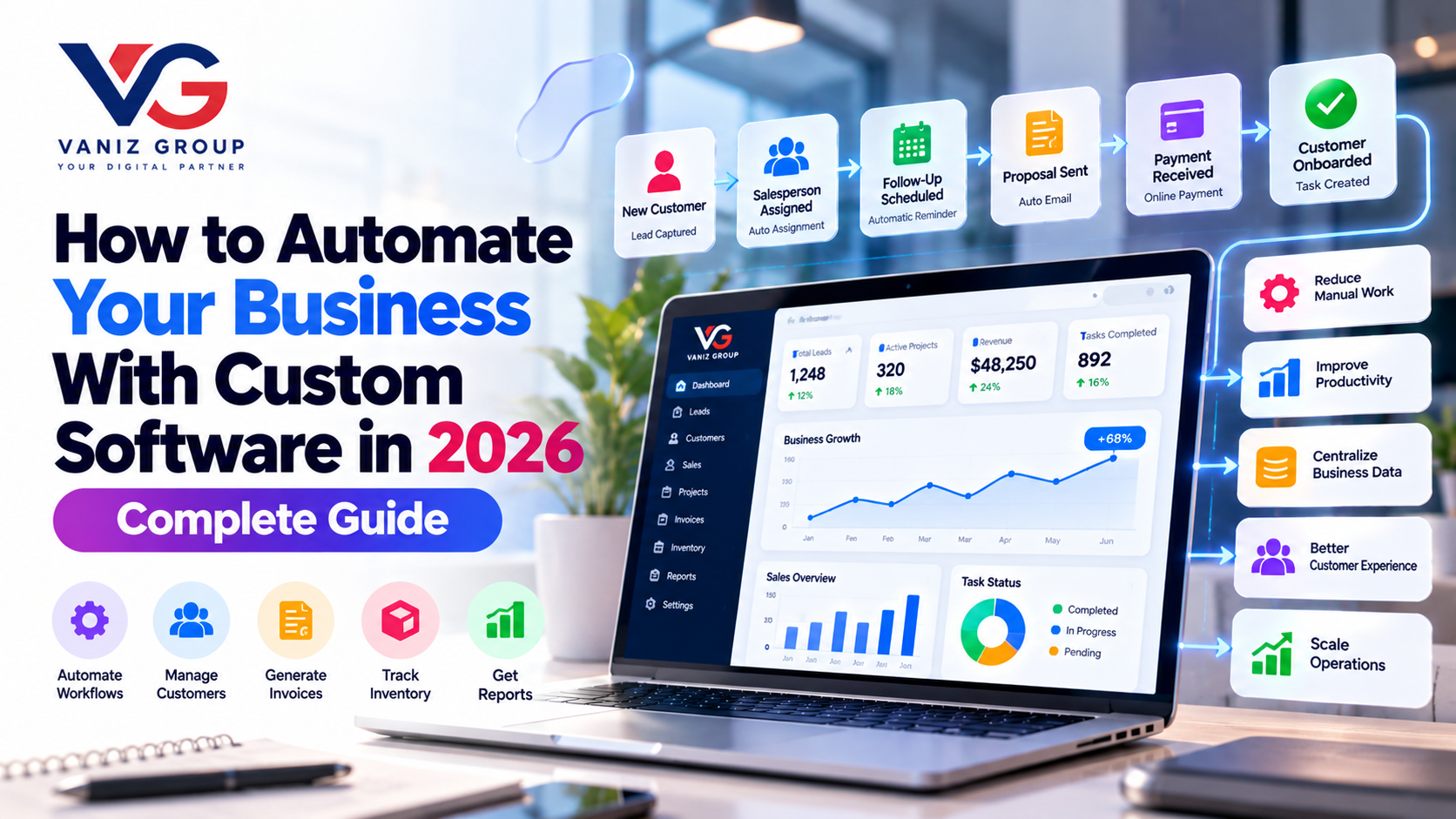
New Customer → Lead Captured → Salesperson Assigned → Follow-Up Scheduled → Proposal Sent → Payment Received → Customer Onboarded → Task Created
The entire workflow can be managed from one system.
Why Should Businesses Automate Their Processes?
Business automation isn't only about saving time. It can also improve consistency, visibility, scalability, and customer experience.
1. Reduce Repetitive Work
Employees spend significant time performing repetitive administrative tasks.
Automation can handle many of these tasks automatically, allowing employees to focus on higher-value activities.
2. Reduce Human Errors
Manual data entry and repetitive processes can result in mistakes.
Automated workflows can apply predefined rules consistently.
3. Improve Productivity
When employees don't have to repeatedly enter the same information or move data between systems, they can spend more time on sales, customer service, strategy, and other important work.
4. Centralize Business Data
Instead of keeping information across spreadsheets, emails, messaging platforms, and separate applications, custom software can provide a centralized system.
5. Improve Customer Experience
Automation can help businesses respond faster through:
Automated notifications
Appointment reminders
Order updates
Customer follow-ups
Support workflows
Personalized communication
6. Scale Operations
A business may need significantly more employees to handle growing operations manually.
Automation allows companies to handle higher transaction volumes without increasing manual workload at the same rate.
Which Business Processes Can Be Automated?
Almost any repetitive, rule-based process can potentially be automated.
Here are some common examples.
Sales and Lead Management
Custom software can automate the sales pipeline from the first inquiry to conversion.
Possible automation includes:
Lead capture
Lead assignment
Lead scoring
Follow-up reminders
Email notifications
Sales pipeline updates
Proposal management
Customer onboarding
Sales reports
For example, when a new lead submits a form, the system can automatically create a CRM record, assign the lead to a salesperson, send a notification, and schedule a follow-up.
Customer Relationship Management
A custom CRM can automate many customer-management processes.
Features can include:
Customer profiles
Contact management
Lead management
Sales pipelines
Follow-up reminders
Customer communication history
Support tickets
Customer segmentation
Automated notifications
Customer analytics
This gives employees a complete view of customer interactions from one platform.
Accounting and Invoicing
Financial workflows can also benefit from automation.
Businesses can automate:
Invoice generation
Payment reminders
Recurring invoices
Payment status updates
Expense tracking
Tax calculations
Financial reports
Receipt management
Payment gateway and accounting integrations can further reduce manual data entry.
Inventory Management
Businesses that sell products often spend considerable time managing inventory.
Custom software can automate:
Stock tracking
Low-stock alerts
Purchase orders
Supplier management
Inventory transfers
Warehouse management
Product updates
Stock reports
For example, when inventory falls below a predefined threshold, the system can automatically generate an alert or purchase request.
Employee Management
Businesses can automate employee-related processes such as:
Employee onboarding
Attendance
Leave requests
Task assignment
Timesheets
Payroll-related workflows
Performance tracking
Employee notifications
Document management
Employees and managers can access relevant information through dedicated dashboards.
Project and Task Management
Custom software can automate project workflows by automatically creating tasks and assigning responsibilities.
For example:
New Project → Project Template Applied → Tasks Created → Team Members Assigned → Deadlines Set → Notifications Sent
This can make project management more predictable and transparent.
How to Automate Your Business With Custom Software
Successful automation starts with understanding the business process before writing software.
Step 1: Identify Repetitive Processes
Start by listing the tasks employees perform repeatedly.
Ask:
Which tasks consume the most time?
Which processes involve spreadsheets?
Where is data entered multiple times?
Which tasks require frequent follow-ups?
Where do mistakes happen?
Which approvals are slow?
Which departments use separate systems?
These areas are usually good candidates for automation.
Step 2: Map Your Existing Workflow
Before developing software, document how the process currently works.
For example:
Lead Generation → Sales Team → Qualification → Proposal → Approval → Payment → Onboarding
Then identify where manual work occurs.
You can separate processes into:
Manual tasks
Automated tasks
Approval steps
Data entry
Notifications
External integrations
Decision points
This creates a clear automation roadmap.
Step 3: Define Automation Rules
Next, determine what should happen automatically.
For example:
If a new lead is created → assign it to a salesperson.
If an invoice becomes overdue → send a reminder.
If inventory reaches minimum level → notify the purchasing team.
If a customer completes payment → activate their account.
Business rules form the foundation of workflow automation.
Step 4: Decide Which Features You Need
Your software should be designed around your actual business requirements.
Depending on the business, it could include:
User management
Customer management
CRM
Inventory
Orders
Payments
Invoicing
Task management
Notifications
Reporting
Analytics
Document management
Workflow automation
Role-based permissions
Audit logs
API integrations
Avoid building unnecessary features during the first version.
Step 5: Design the Software Architecture
The next step is choosing an architecture that can support your workflows.
A typical business automation platform may include:
Frontend → Backend/API → Database → Automation Engine → External Integrations
The automation engine manages business rules and triggers.
For example:
Trigger: Customer completes payment
Actions:
Update payment status
Generate invoice
Activate account
Send confirmation email
Notify account manager
Create onboarding task
This approach allows multiple business processes to work together.
Step 6: Integrate Your Existing Business Tools
Custom software doesn't always need to replace every system your business already uses.
Instead, it can integrate with existing tools.
Common integrations include:
Payment gateways
Accounting systems
CRM platforms
Email services
SMS providers
WhatsApp APIs
Shipping providers
Cloud storage
Calendar systems
Marketing platforms
ERP systems
Third-party APIs
API integration allows information to move automatically between systems.
Step 7: Add Role-Based Access
Different employees should have access to different information.
For example:
Admin: Full system access
Manager: Team, reports, approvals
Salesperson: Leads and customers
Accountant: Invoices and payments
Employee: Assigned tasks and personal information
Role-based access control helps protect sensitive business data.
Step 8: Build Dashboards and Reports
Automation becomes much more valuable when business owners can see what's happening in real time.
A custom dashboard could show:
New leads
Sales
Revenue
Pending payments
Orders
Inventory
Employee activity
Project status
Customer activity
Support tickets
Business performance
Reports can also be generated automatically based on predefined periods or conditions.
Step 9: Test Your Automated Workflows
Automation needs thorough testing because one incorrect rule can affect multiple processes.
Test:
Normal workflows
Failed payments
Duplicate records
Missing information
Incorrect permissions
Notification failures
API failures
Large data volumes
Multiple users
Edge cases
It is important to test not only the software interface but also the complete workflow from beginning to end.
Step 10: Launch, Monitor and Improve
After deployment, monitor how employees actually use the system.
You may discover that some workflows need improvement.
Use analytics and user feedback to:
Remove unnecessary steps
Improve dashboards
Add automation rules
Optimize performance
Fix workflow problems
Add new integrations
Improve user experience
Business automation should evolve as the company grows.
AI-Powered Business Automation
In 2026, businesses can combine traditional workflow automation with AI.
AI can help automate tasks that require understanding text, documents, conversations, or patterns.
Examples include:
AI Customer Support
An AI assistant can answer common questions and route complex issues to human agents.
AI Lead Qualification
AI can analyze incoming leads and categorize them based on predefined criteria.
AI Document Processing
AI can extract information from invoices, forms, contracts, and other documents.
AI Sales Assistance
AI can summarize customer conversations, suggest follow-ups, and help sales teams prioritize opportunities.
AI Recommendations
AI can analyze customer or business data and provide recommendations.
The best approach is often AI + traditional automation, rather than using AI for every workflow.
Technology Stack for Custom Business Automation Software
The technology stack depends on the requirements of the business.
A typical platform may use:
Frontend
React
Next.js
Angular
Vue.js
Flutter for mobile applications
Backend
Node.js
Express.js
ASP.NET Core
C#
Java
Python
Database
PostgreSQL
MySQL
SQL Server
MongoDB
Cloud and Infrastructure
AWS
Microsoft Azure
Docker
CI/CD pipelines
Communication
REST APIs
GraphQL
WebSockets
Email
SMS
Push notifications
The technology should be selected based on scalability, security, integrations, performance, and long-term maintenance requirements.
How Much Does Custom Business Automation Software Cost in 2026?
The cost depends heavily on the number of workflows, integrations, platforms, users, and complexity.
As a broad planning range:
Project Type | Estimated Cost |
|---|---|
Basic Business Automation MVP | $8,000–$20,000 |
Medium Business Automation Platform | $20,000–$50,000 |
Advanced Custom Business Platform | $50,000–$120,000+ |
Enterprise Automation Platform | $120,000+ |
These are general estimates rather than fixed prices. The actual cost depends on the required features, integrations, UI/UX, security requirements, infrastructure, and development complexity.
How Long Does It Take to Build?
Development time also depends on the scope.
Basic Automation System
Approximately 2–4 months
Medium Business Platform
Approximately 4–7 months
Advanced Platform
Approximately 7–12+ months
An MVP can usually be launched earlier, followed by additional automation features in later phases.
Custom Software vs Manual Processes
Factor | Manual Processes | Custom Software |
|---|---|---|
Data Entry | Mostly manual | Can be automated |
Errors | Higher risk | Reduced |
Reporting | Time-consuming | Automated |
Scalability | Limited | Higher |
Workflow | Employee-dependent | Rule-based |
Data | Often scattered | Centralized |
Notifications | Manual | Automated |
Integration | Limited | API-based |
Visibility | Lower | Real-time dashboards |
The goal isn't necessarily to eliminate employees from every process. Instead, custom software should remove unnecessary repetitive work and allow employees to focus on tasks that require human judgment and expertise.
Common Mistakes When Automating a Business
Automating a Poor Process
Software cannot fix a fundamentally inefficient workflow by itself.
First improve the process, then automate it.
Automating Everything at Once
Trying to automate every department simultaneously can increase complexity.
Start with high-impact workflows.
Ignoring Employee Feedback
Employees understand the practical problems within daily processes. Their feedback is valuable when designing automation.
Building Too Many Features
An oversized first version can increase development time and cost.
Start with an MVP and expand based on business needs.
Ignoring Security
Business software may contain customer, financial, employee, and operational data.
Security should be considered from the beginning.
Forgetting Integrations
If your business already relies on external tools, the new platform should be designed to work with them where appropriate.
When Should You Invest in Custom Business Automation Software?
Custom software can make sense when:
Your business has repetitive manual processes
Employees rely heavily on spreadsheets
Multiple systems contain duplicate information
Your existing software doesn't match your workflow
Manual errors are affecting operations
You need real-time business reporting
Your business is growing quickly
You need specialized integrations
Off-the-shelf software requires too many workarounds
For a very small business with simple requirements, an existing SaaS product may be more practical. Custom development becomes more attractive when your processes are unique or existing tools are limiting growth.
Benefits of Automating Your Business With Custom Software
A well-designed automation platform can provide long-term benefits such as:
Reduced repetitive work
Better productivity
Fewer manual errors
Faster business processes
Centralized information
Improved customer experience
Better reporting
Easier collaboration
Greater operational visibility
Improved scalability
Better integration between departments
Most importantly, it gives the business greater control over how its technology supports its operations.
Final Thoughts
Business automation is no longer limited to large enterprises. Startups and growing businesses can also use custom software to automate repetitive processes, connect business systems, improve productivity, and create better customer experiences.
The right approach is to identify the biggest operational problems first, map the workflows, define automation rules, build an MVP, integrate existing systems, and gradually expand the platform.
With modern technologies such as cloud computing, APIs, automation engines, and AI, businesses can build software that does much more than store information—it can actively manage and automate business processes.
Automate Your Business With Vaniz Group
At Vaniz Group, we build custom software solutions designed around specific business processes and operational requirements. From CRM and ERP platforms to workflow automation, AI-powered systems, API integrations, dashboards, and cloud-based applications, we can help turn manual processes into efficient digital workflows.
Have repetitive business processes that are slowing your team down? Build a custom automation solution with Vaniz Group.