 Our Client Reviews



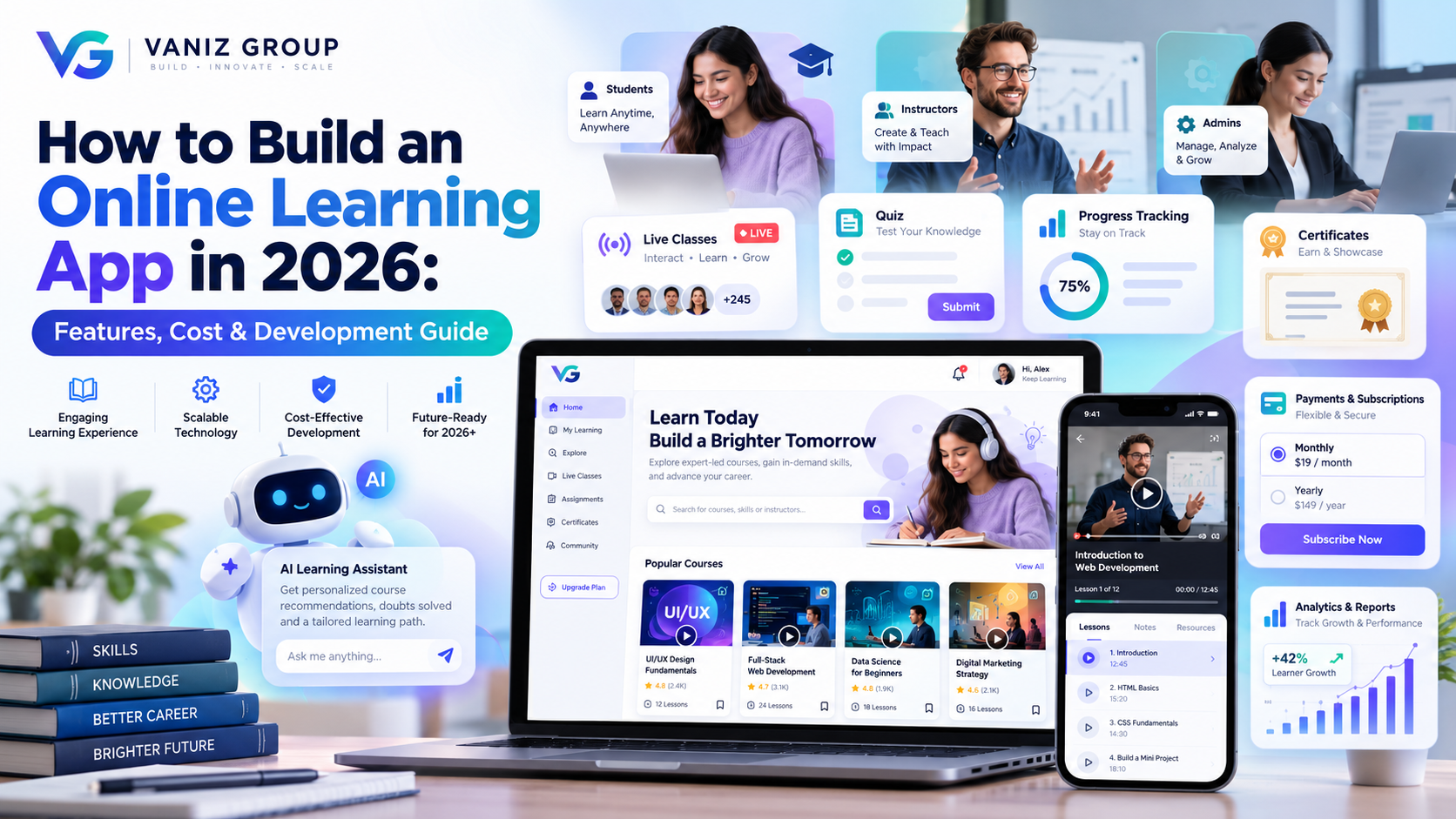
Online learning has become an important part of modern education, professional training, corporate learning, and skill development. From video-based courses and live classes to quizzes, certifications, subscriptions, and AI-powered learning assistants, modern e-learning platforms can provide complete digital education experiences.
If you are planning to launch an online education business, a learning platform can help you reach students beyond geographical boundaries while giving instructors and organizations tools to create, manage, and monetize educational content.
In this guide, we explain how to build an online learning app in 2026, including essential features, technology stack, development process, cost, timeline, monetization models, and advanced features.
What Is an Online Learning App?
An online learning app is a mobile or web-based platform that allows users to learn courses, watch educational videos, attend live classes, complete assignments and quizzes, communicate with instructors, and track their progress.
An online learning platform can serve different audiences, including:
School students
College and university students
Professionals
Corporate employees
Developers and technology learners
Language learners
Exam preparation students
Fitness and skill-training communities
Independent instructors
The platform can offer free content, paid courses, subscriptions, live classes, certifications, or a combination of different learning models.
How Does an Online Learning App Work?
A typical online learning platform connects students, instructors, content, and administrators through a centralized system.
The basic workflow is:
Instructor → Creates Course → Admin Approval → Course Published → Student Enrollment → Learning → Assessment → Progress Tracking → Certificate
Students can browse courses, purchase or enroll in them, watch lessons, complete assessments, and track their progress.
For a marketplace-style platform, instructors can also manage their courses and earnings through a dedicated instructor dashboard.
Key Features of an Online Learning App
A successful e-learning application should provide a simple experience for students while giving instructors and administrators powerful management tools.
1. User Registration and Login
Students should be able to create accounts using:
Email
Phone number
Password
OTP
Google or other social login options
User authentication should be secure and easy to use.
2. Student Profiles
Students can have personalized profiles containing:
Name
Profile photo
Learning interests
Enrolled courses
Completed courses
Certificates
Learning progress
Achievements
Saved courses
This allows the platform to provide a more personalized learning experience.
3. Course Discovery
Students should be able to easily discover relevant courses.
Course discovery can include:
Categories
Search
Filters
Skill level
Instructor
Course duration
Price
Ratings
Language
Popular courses
New courses
A strong search and discovery experience is especially important when the platform contains hundreds or thousands of courses.
4. Course Details
Each course should have a dedicated page containing:
Course title
Description
Instructor information
Course curriculum
Number of lessons
Duration
Skill level
Price
Reviews
Ratings
Learning outcomes
Prerequisites
Sample lessons
Students should be able to understand what they will learn before enrolling.
5. Video Learning
Video lessons are one of the most important features of modern learning platforms.
The application can support:
Recorded lectures
Video courses
Playback controls
Video quality selection
Subtitles
Multiple languages
Playback speed
Resume watching
Chapter navigation
For premium educational platforms, secure video delivery and appropriate content-access controls should also be considered.
6. Live Classes
Online learning apps can also provide live education through:
Live video classes
Instructor-led sessions
Virtual classrooms
Screen sharing
Chat
Q&A
Class recordings
Attendance tracking
Live classes can be particularly useful for exam preparation, professional training, coaching, and instructor-led education.
7. Quizzes and Assessments
Interactive assessments help measure student understanding.
The platform can support:
Multiple-choice questions
True/false questions
Short answers
Practice tests
Course quizzes
Final examinations
Automatic scoring
Time-limited tests
Students can receive immediate feedback after completing assessments.
8. Assignments
Instructors can create assignments and allow students to submit their work through the platform.
Features can include:
Assignment instructions
File uploads
Submission deadlines
Instructor evaluation
Scores
Feedback
Resubmission
9. Learning Progress Tracking
Students should be able to see their learning progress.
For example:
Courses completed
Lessons completed
Current lesson
Quiz scores
Learning hours
Course completion percentage
Certificates earned
Progress tracking encourages students to continue learning.
10. Certificates
The platform can automatically generate certificates when students complete defined course requirements.
Certificates can include:
Student name
Course name
Instructor
Completion date
Certificate ID
Organization name
A verification page can also allow employers or other users to verify certificate information.
11. Ratings and Reviews
Students can rate courses and provide feedback.
Reviews can help:
Build trust
Improve course quality
Help students choose courses
Identify successful instructors
Improve course discovery
Administrators should have moderation controls for reviews.
12. Wishlist and Saved Courses
Students may not want to enroll immediately.
A wishlist allows them to save courses and return later.
The platform can also notify users about:
Price reductions
New lessons
Course updates
Upcoming classes
Limited-time offers
13. Secure Online Payments
For paid courses, the platform can integrate payment gateways.
Payment functionality can support:
Credit/debit cards
Digital wallets
Bank payments
Regional payment methods
Recurring subscriptions
Coupons
Discounts
Refund workflows
The available payment methods depend on the target market.
14. Push Notifications
Notifications can keep students engaged.
Examples include:
New course notifications
Upcoming live classes
Assignment reminders
Quiz reminders
Course completion reminders
Promotional offers
New lessons
Instructor announcements
Users should have appropriate notification controls.
Features for Instructors
If you are building a marketplace-style learning platform, instructors need their own dashboard.
Instructor Dashboard
Instructors can manage:
Courses
Lessons
Videos
Documents
Quizzes
Assignments
Students
Reviews
Live classes
Course pricing
Promotions
Earnings
Analytics
They should be able to create and update course content without requiring technical assistance for every change.
Admin Dashboard Features
The administrator controls the overall platform.
An online learning app admin panel can include:
User Management
Students
Instructors
Accounts
Roles
Permissions
Course Management
Courses
Categories
Lessons
Videos
Documents
Course approvals
Instructor Management
Instructor applications
Verification
Courses
Earnings
Performance
Payment Management
Transactions
Subscriptions
Refunds
Coupons
Revenue
Content Management
Banners
FAQs
Pages
Announcements
Educational resources
Analytics
Total users
Active students
Course enrollments
Revenue
Course completion
Popular courses
Instructor performance
Advanced Features for an Online Learning App
Once the core platform is established, advanced features can make the product more competitive.
AI-Powered Learning Recommendations
AI can analyze learning behavior and recommend courses based on:
Previous courses
Interests
Skill level
Learning history
Goals
Assessment results
AI Learning Assistant
An AI assistant can help students:
Explain concepts
Answer questions
Summarize lessons
Generate practice questions
Create study plans
Provide learning suggestions
The assistant can be connected to approved educational content to provide more relevant responses.
AI-Powered Personalized Learning
The platform can adapt learning experiences according to student performance.
For example, students struggling with a particular topic could receive additional explanations, practice exercises, or recommended lessons.
Gamification
Gamification can improve engagement through:
Points
Badges
Levels
Leaderboards
Learning streaks
Achievements
Rewards
Multi-Language Learning
A global platform can support multiple languages for:
Course content
Captions
User interface
Search
Learning materials
Offline Learning
Students can download supported educational content and continue learning without an active internet connection.
Offline content should use appropriate access controls and licensing arrangements.
Discussion Forums and Communities
Students can interact with instructors and other learners through:
Course discussions
Community forums
Q&A
Private groups
Study groups
This can increase engagement beyond individual lessons.
How to Build an Online Learning App
Step 1: Define Your Business Model
First determine what type of education platform you want to build.
Possible models include:
Individual course marketplace
Subscription-based learning platform
Live coaching platform
Corporate learning platform
Exam preparation platform
University learning platform
Skill-development platform
Language-learning platform
Your business model will influence the features and technology architecture.
Step 2: Identify Your Target Audience
Define exactly who will use the platform.
For example:
School students
Professionals
Developers
Entrepreneurs
Exam candidates
Corporate employees
Language learners
Understanding the target audience helps determine the right content format and user experience.
Step 3: Plan the MVP
Do not necessarily build every feature from day one.
An MVP could include:
Registration
Student profiles
Course catalog
Course details
Video lessons
Quizzes
Progress tracking
Payments
Notifications
Admin dashboard
Advanced AI and marketplace functionality can be introduced later.
Step 4: Design the UI/UX
The interface should make learning simple.
Important screens may include:
Login
Home
Course discovery
Search
Course details
Video player
Quiz
Progress dashboard
Profile
Certificates
Payments
The design should be responsive across smartphones, tablets, and desktops.
Step 5: Choose the Technology Stack
A typical technology stack could include:
Mobile App:
Flutter
React Native
Native Android
Native iOS
Web Application:
React
Next.js
Angular
Vue.js
Backend:
Node.js
Express.js
ASP.NET Core
Java/Spring Boot
Database:
PostgreSQL
MySQL
SQL Server
MongoDB where appropriate
Cloud Infrastructure:
AWS
Microsoft Azure
Docker
CI/CD
Additional services may be required for video storage, video processing, content delivery, notifications, payments, analytics, and live communication.
Step 6: Develop the Backend and APIs
The backend manages the core business logic.
It can handle:
User authentication
Course management
Enrollment
Payments
Learning progress
Quizzes
Certificates
Notifications
Instructor management
Admin functions
APIs allow mobile applications and web applications to communicate with the backend.
Step 7: Build the Learning System
The learning engine should manage:
Course structure
Modules
Lessons
Video content
Assessments
Progress
Completion rules
Certificates
A flexible architecture makes it easier to introduce new educational formats later.
Step 8: Integrate Payments and Subscriptions
If your platform monetizes courses, integrate appropriate payment systems.
You may support:
Individual course purchases
Monthly subscriptions
Annual subscriptions
Premium memberships
Corporate plans
The payment architecture should also handle refunds, failed payments, invoices, and subscription status.
Step 9: Test the Application
Testing should cover:
User registration
Course enrollment
Video playback
Quizzes
Payments
Notifications
Progress tracking
Certificates
Instructor workflows
Admin workflows
Mobile responsiveness
Security
Performance
Load testing is particularly important if you expect large numbers of simultaneous students or live classes.
Step 10: Launch and Scale
After testing, deploy the platform to your production environment.
After launch, monitor:
Server performance
Application errors
Video delivery
User activity
Payment transactions
Course engagement
Conversion rates
Cloud infrastructure can then be scaled as traffic and users increase.
How Much Does It Cost to Build an Online Learning App in 2026?
The development cost depends on the platform's features, number of applications, integrations, content architecture, and level of customization.
Basic Online Learning MVP
Estimated cost: $15,000–$30,000
Typically includes:
Student registration
Course catalog
Video lessons
Basic quizzes
Progress tracking
Payments
Notifications
Admin panel
Medium Learning Platform
Estimated cost: $30,000–$70,000
May include:
Student and instructor applications
Course marketplace
Live classes
Advanced quizzes
Certificates
Subscriptions
Instructor dashboard
Analytics
Advanced admin controls
Advanced E-Learning Platform
Estimated cost: $70,000–$150,000+
May include:
AI learning assistant
Personalized recommendations
Advanced analytics
Gamification
Multi-language support
Offline learning
Live classrooms
Enterprise features
Advanced integrations
Scalable cloud architecture
These figures are broad planning estimates. The actual development cost depends on the exact requirements, platforms, integrations, design complexity, development team, and infrastructure.
How Long Does It Take to Build an Online Learning App?
The development timeline varies according to scope.
Basic MVP: approximately 3–5 months
Medium learning platform: approximately 5–8 months
Advanced e-learning platform: approximately 8–12+ months
A clear MVP scope can help launch the first version sooner and allow the product to evolve based on real student and instructor feedback.
Common Challenges in Online Learning App Development
Video Streaming
Large-scale video delivery requires appropriate storage, processing, bandwidth, and content delivery infrastructure.
Content Security
Premium educational content should be protected with appropriate access controls and content-delivery mechanisms.
Student Engagement
Simply providing courses does not guarantee completion. Progress tracking, reminders, gamification, communities, and personalized learning can improve engagement.
Instructor Management
Marketplace platforms need workflows for instructor onboarding, verification, course approval, earnings, and content management.
Payment and Subscription Management
Recurring subscriptions, refunds, failed payments, coupons, and regional payment methods can increase development complexity.
Scalability
As the number of students, courses, and videos increases, the architecture needs to handle larger traffic volumes efficiently.
Data Privacy and Security
Learning platforms may store personal information, payment-related information, educational records, and communication data. Appropriate security and privacy controls should be implemented according to the applicable jurisdiction and use case.
How to Make Your Online Learning App Stand Out
The e-learning market is competitive, so simply offering video courses may not be enough.
You can differentiate your platform through:
AI-powered learning
Personalized study plans
Industry-specific courses
Expert instructors
Live mentorship
Career-focused learning
Certification programs
Gamification
Community learning
Multilingual courses
Affordable subscriptions
Corporate training
Exam preparation
Skill assessments
Offline learning
Interactive learning experiences
A focused niche can often be more effective than trying to serve every type of learner.
Online Learning App Monetization Models
There are several ways to generate revenue.
Course Sales
Students pay individually for courses.
Subscription
Users pay monthly or annually to access a library of courses.
Freemium
Basic content is free while premium lessons and features require payment.
Instructor Commission
The platform takes a percentage of instructor course sales.
Corporate Plans
Companies pay for employee training and learning programs.
Certification Fees
Users may pay for professional assessments or certificates where appropriate.
Premium Learning Features
Advanced features such as personalized learning, mentorship, or AI assistance can be included in premium plans.
Final Thoughts
Building an online learning app in 2026 involves much more than creating a video library. A successful platform needs a complete learning ecosystem that combines course management, video learning, assessments, progress tracking, payments, instructor tools, analytics, and an engaging user experience.
AI is also creating new opportunities for personalized education. AI assistants, intelligent recommendations, automated assessments, and adaptive learning can help platforms deliver more personalized experiences.
The best approach is to start with a focused MVP, validate your business model, and gradually introduce advanced functionality as your user base grows.
Build Your Online Learning App With Vaniz Group
Vaniz Group can help you build a customized online learning platform for education companies, training providers, coaching businesses, universities, instructors, and startups.
From UI/UX design and mobile app development to backend APIs, payment integration, cloud deployment, AI automation, dashboards, and scalable architecture, we can develop an e-learning solution around your specific business model.
Have an online learning app idea? Contact Vaniz Group to discuss your requirements and development plan.