 Our Client Reviews


Launching a new website is only the first step toward building an online presence. If Google has not discovered and indexed your website, your pages may not appear in Google Search even when users search for your business, products, or services.
Getting a website indexed by Google involves making sure search engines can discover, crawl, understand, and store your pages in their search index.
The good news is that most websites can improve their chances of being indexed by following a few important technical and content practices.
In this guide, we explain how Google indexing works, how to submit your website to Google, how to identify indexing problems, and what you can do to help your important pages get discovered.
What Does Google Indexing Mean?
Google uses automated systems, commonly called crawlers, to discover and analyze web pages.
When Google discovers a page, it may crawl the page, process its content, and decide whether the page should be included in its search index.
The basic process can be understood as:
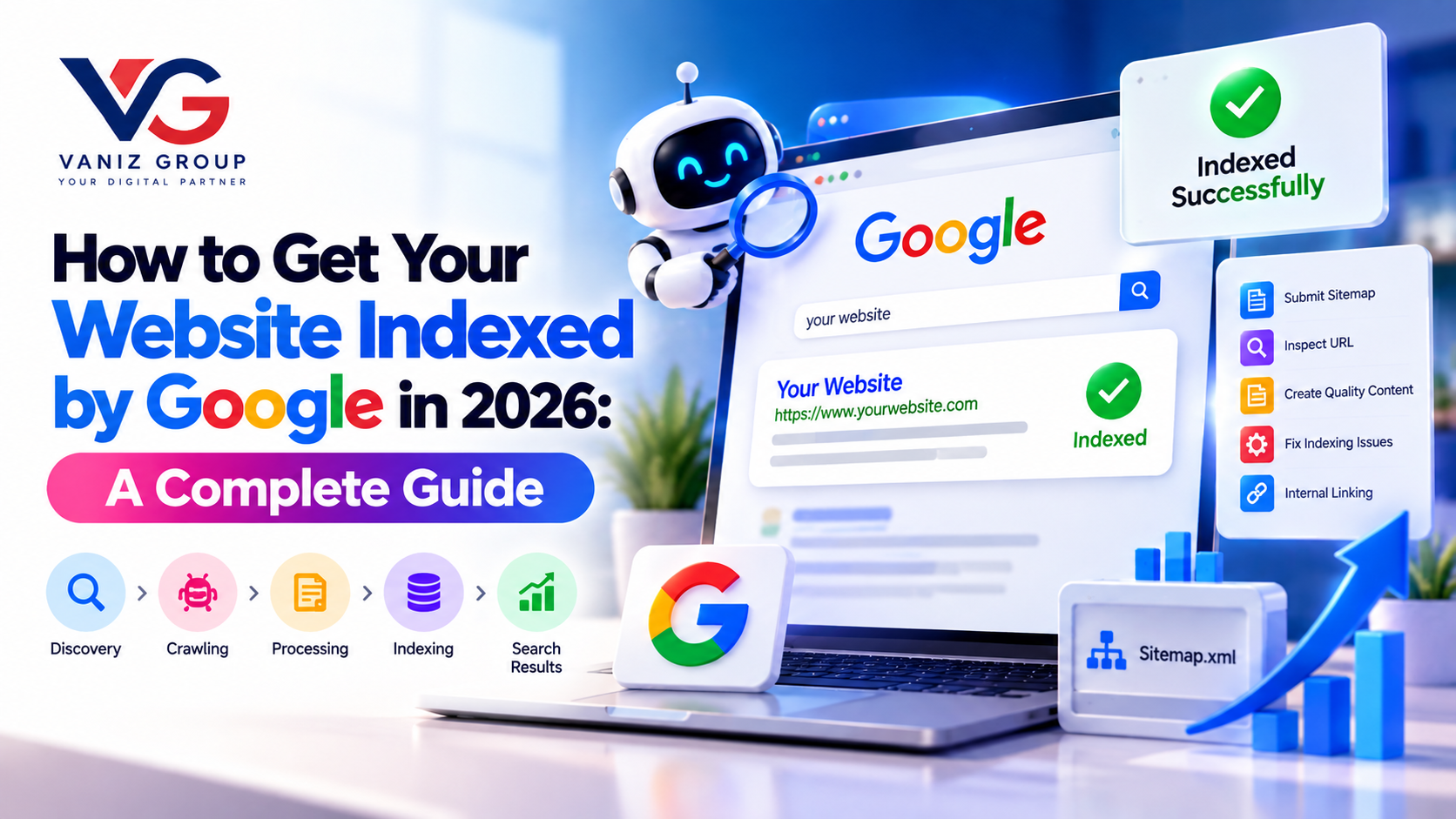
Discovery → Crawling → Processing → Indexing → Search Results
For example, if you create a new page called:
/custom-software-development
Google needs to discover that URL, access the page, understand its content, and potentially include it in its index.
Being indexed does not guarantee that a page will rank highly.
There is an important difference between:
Indexed: Google has included the page in its search index.
Ranking: The page appears in search results for particular queries.
Your first goal is to make important pages accessible and indexable. Ranking requires additional SEO work.
Why Is Website Indexing Important?
If an important page isn't indexed, it generally won't be eligible to appear in Google's organic search results.
For a business website, this can affect visibility for:
Service pages
Product pages
Location pages
Blog posts
Landing pages
Industry pages
Case studies
Resource pages
For example, a software company might have pages for:
Web Development
Mobile App Development
AI Development
E-Commerce Development
Custom Software Development
If those pages are not properly discoverable and indexable, the website may miss opportunities to appear for relevant searches.
How to Get Your Website Indexed by Google
1. Make Sure Your Website Is Live
Before worrying about indexing, make sure your website is publicly accessible.
Check that:
Your domain works
Pages load correctly
HTTPS is configured
Important pages aren't behind a login
The server is responding correctly
Your website doesn't accidentally block search engine crawlers
If Google cannot access your website, it cannot properly crawl your pages.
2. Set Up Google Search Console
Google Search Console is one of the most useful tools for understanding how Google interacts with your website.
It can help you:
Monitor indexing
Inspect individual URLs
Submit sitemaps
Identify indexing issues
View search performance
Check mobile usability and technical issues
Monitor search queries
Review crawl-related information
Start by adding your website property to Google Search Console and completing the required verification.
Once your property is verified, you can use the available reports to understand how Google sees your website.
3. Submit Your XML Sitemap
An XML sitemap provides search engines with a structured list of URLs that you consider important.
A typical sitemap may contain URLs such as:
https://example.com/
https://example.com/about/
https://example.com/services/
https://example.com/blog/
https://example.com/contact/
For larger websites, the sitemap may contain hundreds or thousands of URLs.
Submit your sitemap through Google Search Console.
A common sitemap URL is:
https://example.com/sitemap.xmlHowever, the actual location depends on how your website is built.
What Should Your Sitemap Include?
Ideally, include important canonical URLs that:
Return successful responses
Are accessible to users
Contain useful content
You want Google to discover
Are not intentionally blocked from indexing
Avoid treating the sitemap as a list of every URL your system can generate.
4. Use URL Inspection in Google Search Console
If you have published an important page and want to check whether Google can access it, use the URL Inspection feature in Search Console.
Enter the complete URL.
Google may show information about:
Whether the URL is indexed
Whether the URL is eligible for indexing
Crawling information
Canonical URL
Mobile experience
Page availability
If the page isn't indexed and is eligible for indexing, you may have an option to request indexing.
This can be useful for newly published or substantially updated pages.
However, requesting indexing does not guarantee immediate indexing or a particular search ranking.
5. Create Internal Links
Internal links are links from one page on your website to another page on the same website.
They can help users navigate your website and help search engines discover relationships between pages.
For example, a blog about e-commerce development could link to your:
E-Commerce Development page
Custom Software Development page
Payment Integration page
API Development page
Similarly, a mobile app development article could link to:
Mobile App Development
Flutter Development
Custom Software Development
Cloud Solutions
Important pages should generally not exist as isolated URLs with no meaningful internal links pointing to them.
6. Make Your Website Easy to Crawl
Google needs to be able to follow links and access your pages.
Check your website for:
Broken internal links
Incorrect redirects
Dead pages
Server errors
JavaScript-related navigation problems
Orphan pages
Incorrect canonical tags
Accidentally blocked resources
A clear website structure can make it easier for both users and search engines to navigate the site.
For example:
Home
→ Services
→ Web Development
→ E-Commerce Development
→ Blog
→ E-Commerce Articles
This type of logical structure makes relationships between pages clearer.
7. Check Your Robots.txt File
The robots.txt file can provide crawling instructions to search engine crawlers.
It is usually available at:
https://example.com/robots.txtA common mistake is accidentally blocking important sections of a website.
For example, if a site's robots.txt configuration prevents Google from crawling important pages, those pages may have difficulty being discovered or processed correctly.
Always review your robots.txt configuration after launching a new website or making major changes.
8. Check Your Noindex Tags
A page can also contain a noindex directive telling search engines not to include it in their index.
For example:
<meta name="robots" content="noindex">This can be intentional for pages such as:
Internal search results
Certain administrative pages
Temporary pages
Duplicate or low-value pages
But accidentally adding noindex to an important service or product page can prevent that page from appearing in Google Search.
If an important page isn't being indexed, check whether a noindex directive is present.
9. Make Sure Pages Return the Correct HTTP Status
Search engines need to understand whether a URL represents a valid page.
Important pages should generally return a successful HTTP response.
Common status codes include:
200: Page successfully available
301: Permanent redirect
302: Temporary redirect
404: Page not found
500: Server error
If an important page repeatedly returns an error, Google may not be able to index it properly.
Regularly check your website for broken URLs and server errors.
10. Create Useful, Original Content
Technical accessibility alone doesn't guarantee that every page will be indexed.
Your pages should provide useful information for visitors.
For example, instead of creating several almost identical service pages targeting slightly different keywords, create pages with genuinely useful differences.
A strong service page could include:
Clear service explanation
Target customers
Features
Development process
Technologies
Use cases
FAQs
Examples
Benefits
Relevant internal links
Contact or consultation CTA
Quality and usefulness should remain the priority.
11. Avoid Duplicate Content
If multiple URLs contain substantially similar content, search engines may have difficulty determining which URL should be treated as the primary version.
Common causes include:
Multiple URL parameters
Duplicate product URLs
HTTP and HTTPS versions
www and non-www versions
Duplicate category pages
Printer-friendly URLs
Tracking parameters
Use canonical URLs and appropriate redirects where necessary to help communicate your preferred URL structure.
12. Use Canonical URLs Correctly
A canonical tag can indicate which URL you consider the preferred version of a page.
For example:
<link rel="canonical" href="https://example.com/services/web-development">Canonicalization is particularly useful when multiple URLs can display similar or duplicate content.
However, canonical tags should be implemented carefully. A canonical tag is a signal, not an absolute command that guarantees which URL Google will select.
13. Improve Website Speed and Performance
Website performance is important for user experience and overall website quality.
Improve performance by:
Compressing images
Using modern image formats
Reducing unnecessary JavaScript
Optimizing CSS
Using caching
Improving server response time
Using a CDN when appropriate
Optimizing database queries
A fast website is easier for users to navigate and provides a stronger foundation for SEO.
14. Make Your Website Mobile-Friendly
Google uses mobile-first indexing for websites, which means the mobile version of your site is particularly important for how Google crawls and indexes content.
Make sure your mobile website contains the important content and functionality available on the desktop version.
Check:
Responsive design
Navigation
Text readability
Buttons
Forms
Images
Page speed
Content visibility
Avoid creating a mobile version that removes important content from the desktop experience.
15. Use Descriptive URLs
Simple URLs can make your website structure easier to understand.
For example:
Less descriptive:
example.com/page?id=4837More descriptive:
example.com/mobile-app-developmentGood URLs should be:
Relevant
Readable
Consistent
Relatively concise
Avoid changing URLs unnecessarily because URL changes can create additional SEO and redirect considerations.
16. Add Structured Data Where Appropriate
Structured data provides additional information about your content in a format that search engines can process.
Depending on the page, structured data may be appropriate for things such as:
Organization
Local business
Product
Article
Breadcrumbs
Event
FAQ content where eligible
Structured data does not guarantee enhanced search results, but accurate implementation can help search engines understand certain types of content.
Only mark up information that is actually present and relevant to the page.
17. Build External Links and Brand Mentions
Internal links help Google discover pages within your website, while external links can help establish connections between your website and the wider web.
You can build your online presence through:
Industry publications
Relevant directories
Business profiles
Partnerships
Guest contributions
Digital PR
Original research
Case studies
Industry resources
The goal should be to build genuine online authority and discoverability rather than simply collecting as many backlinks as possible.
18. Keep Publishing Fresh Content
A website that continually adds useful content can create more opportunities to appear for relevant searches.
You can publish:
Educational guides
Industry articles
Case studies
Product guides
Service articles
Tutorials
FAQs
Comparison articles
Technology explainers
For example, a software development company could build content around:
Mobile app development
SaaS development
AI application development
E-commerce development
Healthcare software
Restaurant software
Booking platforms
Custom business applications
This creates a broader content ecosystem around your services.
How to Check Whether Your Website Is Indexed
There are several ways to investigate indexing.
Method 1: Google Search Console
Use URL Inspection to check individual URLs.
Method 2: Search Google
You can search:
site:example.comThis can provide a rough indication of which pages from your domain are appearing in Google's index.
However, search operators should not be treated as a complete or exact indexing report.
Method 3: Review Search Console Reports
Search Console can provide more useful information about:
Indexed pages
Pages not indexed
Reasons for exclusions
Crawling issues
Search performance
For ongoing SEO work, Search Console should generally be part of your regular website monitoring process.
Why Is My Website Not Getting Indexed?
If your website isn't appearing in Google, several issues may be responsible.
New Website
Google may simply not have discovered the site yet.
No Sitemap
Google can discover pages without a sitemap, but a sitemap can make URL discovery easier, especially for larger sites.
No Internal Links
Pages that aren't linked from other pages can be harder to discover.
Robots.txt Blocking
Your site may be preventing crawlers from accessing important content.
Noindex Directive
Important pages may accidentally contain a noindex instruction.
Poor Technical Performance
Server errors, broken links, incorrect redirects, or other technical problems can interfere with crawling.
Duplicate or Low-Value Pages
Search engines may choose not to index every URL they encounter.
Manual or Security Issues
Search Console should be checked for relevant security or manual-action notifications.
How Long Does Google Take to Index a Website?
There is no guaranteed indexing time.
A new page may be discovered relatively quickly, while other pages can take longer.
Factors that can influence discovery and crawling include:
Website size
Internal linking
Sitemap availability
Website popularity
Content quality
Technical accessibility
Server reliability
How frequently content changes
Requesting indexing through Search Console can help communicate that a page is ready for consideration, but it does not guarantee immediate indexing.
Google Indexing vs Google Ranking
These two concepts are often confused.
Indexing
Google has processed a page and included it in its search index.
Ranking
Google determines where the page may appear for a particular search query.
For example, suppose you publish:
How to Build a Food Delivery App in 2026
Google may index the page.
That doesn't automatically mean it will appear on the first page for:
food delivery app development
Ranking depends on many factors, including relevance, content quality, competition, authority, technical factors, and search context.
Therefore, indexing is the foundation, while SEO helps improve visibility and ranking.
Google Indexing Checklist
Before publishing important pages, use this checklist:
Website is publicly accessible
HTTPS is working
Google Search Console is configured
XML sitemap is available
Sitemap is submitted
Important pages have internal links
Robots.txt is configured correctly
Important pages don't have
noindexPages return the correct status
Canonical URLs are configured appropriately
Content is useful and original
URLs are descriptive
Website works well on mobile
Images are optimized
Website performance is monitored
Structured data is used where appropriate
Broken links are fixed
Search Console is monitored regularly
Final Thoughts
Getting your website indexed by Google is an essential first step toward building organic search visibility.
Start by making your website accessible, setting up Google Search Console, submitting your sitemap, creating strong internal links, checking robots.txt and noindex directives, and fixing technical problems.
Then focus on the bigger SEO picture: useful content, strong website architecture, mobile usability, performance, relevant keywords, internal linking, authority, and a good user experience.
Remember that indexing does not guarantee rankings. Your website needs to provide valuable content and a technically strong experience if you want to compete for meaningful search visibility.
For businesses investing in SEO in 2026, the best approach is to treat indexing as the foundation of a broader website visibility and organic growth strategy.